
Real-time face swap does not generate one swapped image and then somehow make it move. It keeps processing new camera frames, reads your current pose and expression, and generates the reference identity into the live scene again and again. That means the hard part is not only making one frame look right, but also producing the next frame quickly enough and keeping the result stable over time.
A simple way to picture the loop is:
Camera → Understand the face → Add reference identity → Generate → Blend → Output → Repeat on the next frame
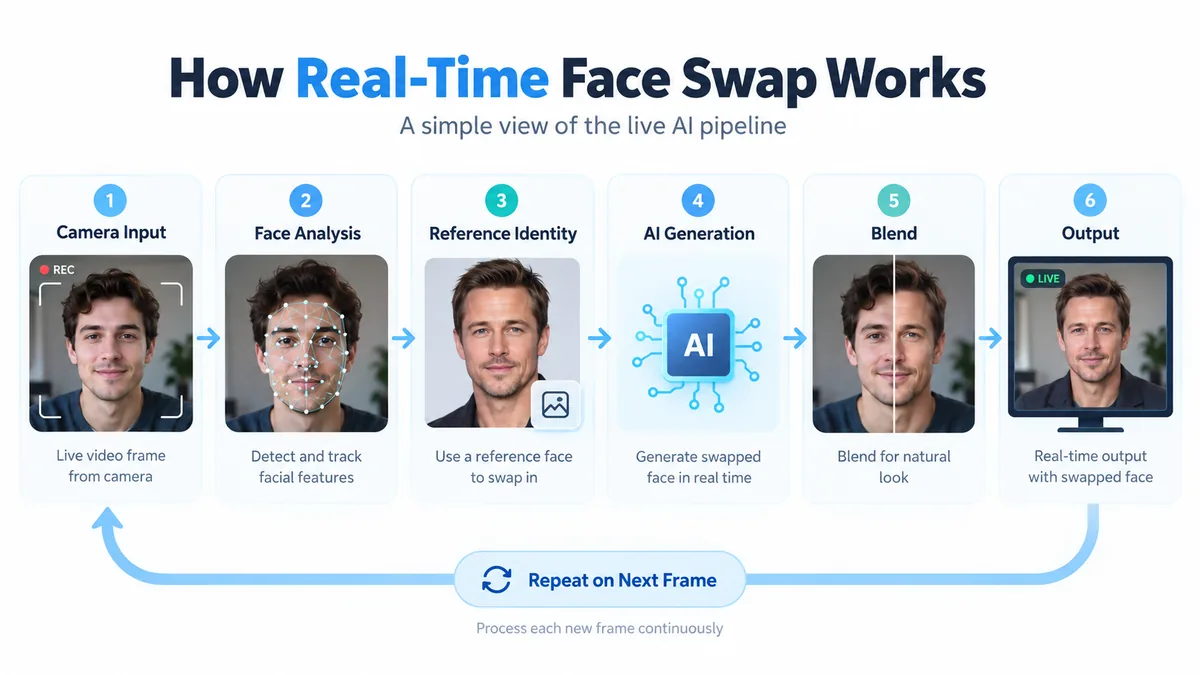
Real-time face swap keeps processing new frames
A webcam does not send the AI one finished picture. It continuously produces video frames, and the system has to process those frames fast enough to keep the result feeling live.
That is one of the biggest technical differences between a photo face swap and a real-time one. A photo only needs one final result to look correct. A live system has to keep updating while you talk, turn your head, blink, or move closer to the camera.
From your point of view, the picture is simply moving. From the system's point of view, it keeps answering the same question: what is happening in the camera right now, and what should this moment look like with the target identity?
The AI first has to understand where your face is and what it is doing
Before it can generate anything useful, the system needs to understand the current camera frame.
That can include estimating:
- whether a face is visible;
- where it is and roughly how large it is;
- which direction the head is facing;
- where important facial structures such as the eyes, nose, mouth, and outline are;
- whether the person is smiling, speaking, turning, or making another expression or pose.
The point is not simply to place a set of landmarks on a face. The generation step needs enough information to follow what the person is doing right now.
If you slowly turn from a front view to a side view, the output cannot keep showing the same front-facing face. If you open your mouth while speaking, the generated mouth should not stay frozen. Extreme angles and heavy occlusion from hands, hair, microphones, or other objects make this harder because less useful facial information is visible.
The reference image says who; the live camera says what they are doing
This is the easiest way to understand the two main inputs.
The reference image mainly provides identity and appearance. The live camera provides the current motion, expression, pose, and scene. The AI combines those signals to generate a new live frame.
For example, you might upload a reference portrait and then smile, turn your head, or speak in front of the webcam. Ideally, the output follows your movement while showing the identity and appearance of the reference person.
Decart describes the same relationship in the Lucy 2.1 documentation: the reference image acts as the visual identity target, while the real-time video provides motion, expressions, and pose. That is a useful mental model for understanding the core inputs to real-time face transformation.
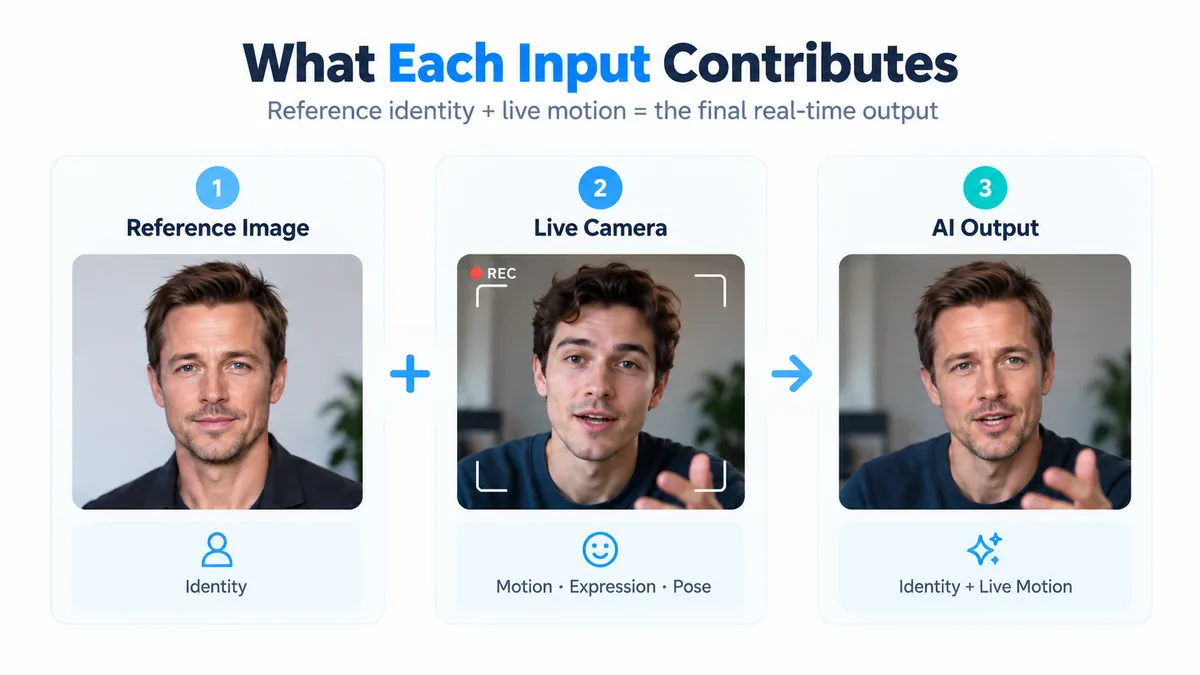
One good frame is not enough: the video has to stay consistent
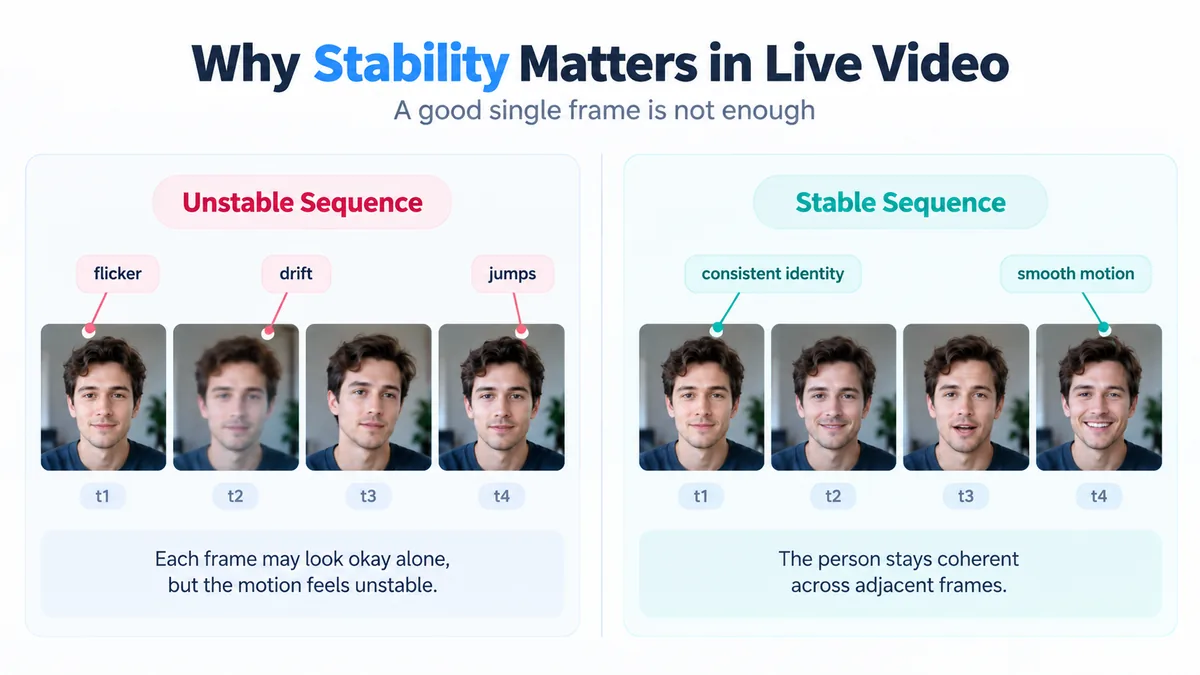
A still image only has to look correct once. Live video has an extra requirement: the previous frame, the current frame, and the next frame should all look like the same continuous person.
A model can produce individually convincing frames and still look bad in motion if neighboring frames change too much. Typical symptoms include:
- edges flickering from frame to frame;
- the identity drifting slightly over time;
- certain head angles suddenly looking less like the reference;
- brief ghosting or jumps when an expression changes.
In technical terms, this is usually discussed as temporal consistency.
It is one of the major differences between live video generation and single-image generation. In its Lucy 2.5 release, Decart highlights stronger temporal consistency and lower latency together as key improvements for live video. In other words, live-video quality is not only about how good each frame looks on its own; it is also about whether the sequence stays stable when played continuously.
The generated face still has to fit back into the original frame
After the AI generates the target face or appearance, the job is not finished. The result still has to sit naturally inside the camera frame rather than looking like a sticker placed on top of it.
The system may need to handle things such as:
- whether the forehead, cheeks, and jawline connect naturally;
- whether lighting and skin tone match the surrounding image;
- whether hands, hair, glasses, or other objects pass in front of the face correctly;
- whether the generated region stays attached to the person as they move.
This stage is often described as blending or compositing. You do not need to know the exact algorithm to understand the distinction: generating a face and making that face belong naturally inside the current video frame are two different problems.
Why real-time face swap has to trade quality against speed
Offline image generation can spend more time on a frame if the extra computation improves the result. Real-time video has much less room to wait.
From the moment a camera frame is captured to the moment you see the AI result, the pipeline may include capture, encoding, network transport, AI inference, decoding, and display. If desktop software then sends the result into another app, virtual-camera and target-app buffering can add more delay.
So the practical goal is usually not literal zero latency. It is low and stable end-to-end latency while continuously producing video that is good enough to feel natural.
A more complex model does not automatically create a better live experience. If every frame is more detailed but takes too long, the video falls behind your movement. If the system optimizes only for speed, it may lose identity similarity, detail, or stability.
Decart's research pages discuss frames per second and latency as core real-time model metrics, which is one reason real-time AI is evaluated differently from offline image generation.
A little deeper: what makes real-time AI video difficult?
If you only want the basic explanation, you can skip this section. At a more technical level, the challenge can be reduced to three ideas.
It is continuous generation, not a one-time render
The model has to keep accepting new camera input and producing new output. If any stage becomes consistently slower, you eventually see latency, dropped frames, or motion that feels delayed.
It cannot care only about the current frame
If each frame independently tries to maximize “how good this image looks,” the sequence may keep changing from moment to moment. Real-time video needs both current-frame quality and consistency of identity, structure, and motion across neighboring frames.
Every frame has a time budget
At 30 FPS, a display presents about 30 frames every second, or roughly 33 milliseconds of display time per frame. A real end-to-end system can use pipelining, buffering, and parallel processing, so this does not mean all computation must finish inside 33 ms. It is simply a useful way to see why real-time models care so much about efficiency and latency.
That is also why public real-time model descriptions emphasize continuous generation, FPS, and low latency: a live system has to balance single-frame quality, temporal stability, computation, and responsiveness at the same time.
Where does the processed live video go?
The generated frames eventually have to reach somewhere you can actually see or use them.
In the LiveFaceSwap online workflow, the path can be simplified to:
Camera → Cloud AI → Browser Output
The live camera feed is processed by the cloud AI and the result is continuously returned to the browser.
The desktop app can also expose the processed output through LiveFaceSwap Camera, so compatible apps such as OBS or Zoom can use it as a camera source. The virtual camera is not another AI model; it is closer to an output interface that lets other software receive the processed video.
For more on that part of the workflow, see What Is the LiveFaceSwap Virtual Camera?.
Why the reference image, webcam, and lighting still affect the result
AI does not operate independently of its inputs.
The reference image provides the target identity. The camera provides the current pose, expression, and scene. The clearer and more stable those inputs are, the easier it is for the system to determine both who should appear and what that person should be doing right now.
In practice, results can be affected by:
- how clearly the person appears in the reference image;
- webcam image quality;
- lighting stability;
- long periods at extreme side angles or with heavy facial occlusion;
- network and processing-pipeline stability.
Hardware requirements depend on whether the main AI workload runs locally or in the cloud. LiveFaceSwap uses cloud-based real-time AI processing, so you do not need a high-end dedicated GPU for local AI inference. See Does Real-Time Face Swap Need a GPU? for the full explanation.
If you understand the basic mechanism and want to try the workflow yourself, continue with How to Swap Faces in Real Time.