
Real-time face swap does not always require a dedicated GPU.
If the AI model runs locally, GPU requirements depend on the software and the real-time performance it needs. If the main AI inference runs in the cloud, your computer does not need a dedicated GPU for AI inference.
Start with the key difference: where does the AI run?
| Processing mode | AI runs on | Dedicated GPU needed? | Main consideration |
|---|---|---|---|
| Local processing | Your computer | Yes, unless the tool explicitly supports CPU or another acceleration path | Hardware performance and compatibility |
| Cloud processing | Remote infrastructure | Not on your computer | Network, camera, and service stability |
That distinction determines the GPU requirement. With local inference, your computer carries the sustained AI workload. With cloud inference, your device mainly handles camera capture, network transport, and displaying the returned result.
Why does local real-time face swap rely more on a GPU?
Real-time face swap has to keep processing a live camera feed. The software must keep finding or tracking the face, run the model, and blend the result into the live video. Some tools also improve edges, handle partially covered faces, or enhance the image. Compared with processing a single photo, this sustained workload puts much more pressure on real-time performance.
When the main inference runs on your computer, a GPU is generally better suited to that sustained workload. Whether a local tool runs well still depends on software compatibility, GPU performance, and available VRAM.
Common bottlenecks include:
- Your GPU is not supported: If the tool requires a specific acceleration path and your hardware is unsupported, that path will not work. If the tool has no alternative execution path, the model may not run.
- Your GPU is too slow: The model may start but run at a lower frame rate or with more delay, especially when OBS, a game, or another GPU-heavy application is open.
- There is not enough VRAM: The model may fail to load, or you may need to lower the resolution, disable enhancement, reduce the workload, or use memory offloading or another backend if the tool provides one. On a dedicated graphics card, VRAM is the card's own memory used for graphics and model workloads.
- You use AMD, Intel, or Apple hardware: Acceleration depends on whether the tool provides DirectML, OpenVINO, CoreML, or another matching execution path.
NVIDIA is not the only option. A GPU brand or model name by itself does not tell you whether a local tool will work; the software, operating system, and execution backends supported by the current version matter just as much. Check the target tool's documentation, or see the ONNX Runtime execution provider documentation for an overview of common execution options.
There is also no single VRAM requirement that applies to every local face swap tool. Model choice, processing resolution, multiple-face support, enhancement settings, and other applications using the GPU can all change memory use.
Why does cloud real-time face swap not need a local GPU?
Cloud processing does not remove the computing requirement. It moves the main AI inference from your computer to remote infrastructure.
A typical workflow looks like this:
Camera → Network → Cloud AI processing → Result returned to the browser or desktop app
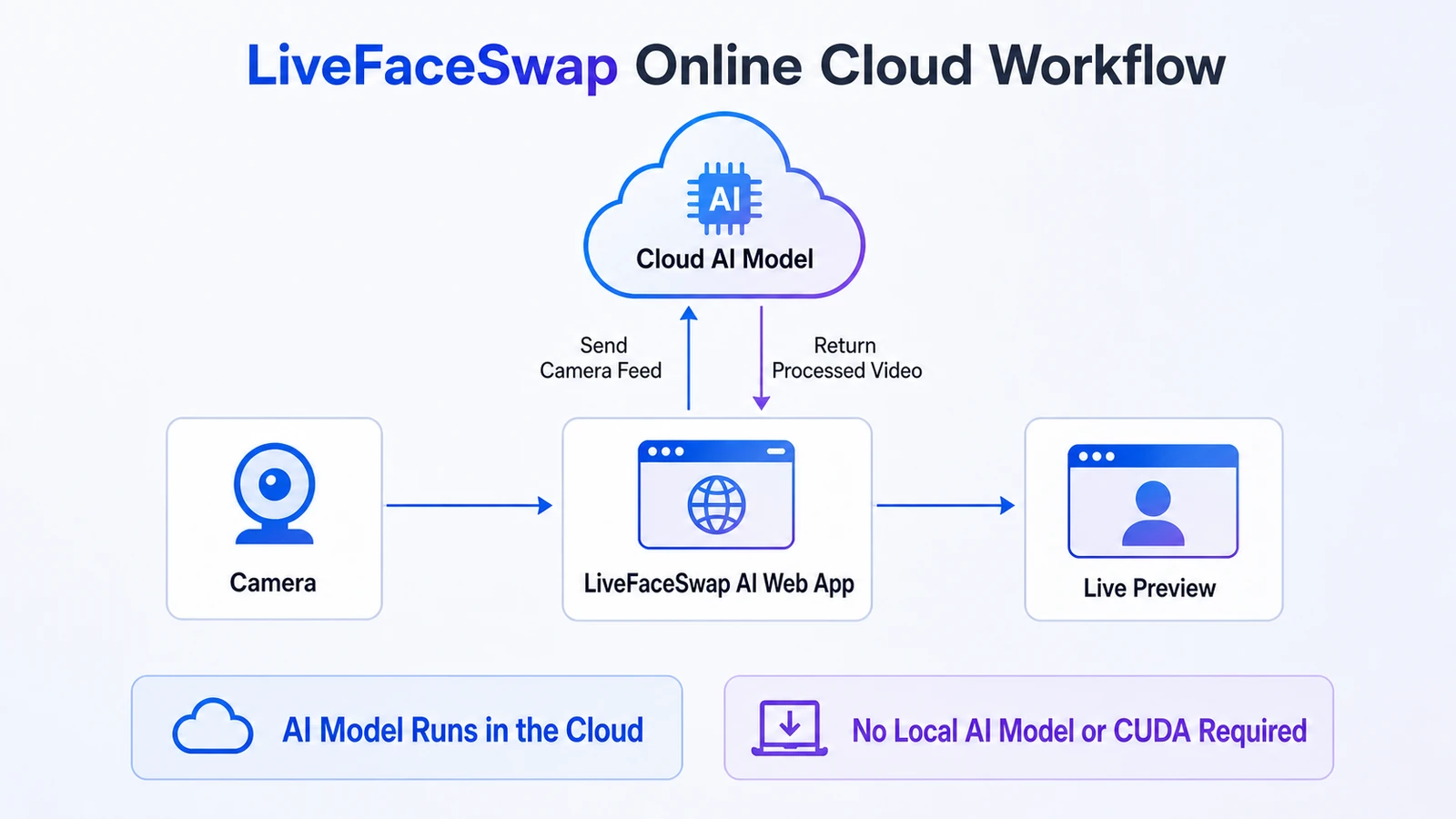
In this setup, your local device mainly captures the camera feed, sends and receives video, and displays the processed result. Because the main model is not running on your computer, you do not need to install a local AI model, CUDA, or a dedicated GPU for inference.
Your local device still matters, however. Network quality, camera quality, video playback capability, and service availability can all affect the experience. Cloud processing lowers the local GPU barrier; it does not eliminate local-device and network requirements.
Can you use real-time face swap without a dedicated GPU?
Yes. The answer depends on where the AI runs:
- Cloud processing: Yes. The main AI inference runs on remote infrastructure, so your computer does not need a dedicated GPU.
- Local processing: It depends on the tool. Some tools offer a CPU path or support acceleration on AMD, Intel, or Apple hardware. But being able to launch on CPU is not the same as delivering usable real-time performance; with comparable models and video settings, CPU-only processing is usually much harder to keep smooth in real time.
So, not having a dedicated NVIDIA GPU does not automatically rule out real-time face swap. What matters is where the tool runs its main AI workload and whether it supports your hardware, operating system, and available acceleration path.
Should you choose cloud or local processing?
If your main question is whether you need to prepare or buy a GPU for real-time face swap, these five factors are the most useful place to start:
| What to compare | Cloud real-time face swap | Local real-time face swap |
|---|---|---|
| Dedicated GPU | Not required on your computer | Requires a compatible GPU unless the tool explicitly offers CPU or another path |
| Setup | AI inference does not require a local model or CUDA | Local inference must satisfy the tool's model, driver, and runtime requirements |
| Internet | AI processing requires a connection to the cloud service | Inference runs locally; installation, downloads, or licensing may still need internet access |
| Hardware cost | No dedicated GPU purchase is required for AI inference | If your current hardware does not meet the tool's requirements, you need to buy or upgrade compatible hardware |
| Usage cost | Cloud AI service fees apply; billing may be subscription-, credit-, or usage-based | No cloud inference fee; costs come from software licensing (if any), electricity, and hardware |
How to choose
- You do not have a suitable GPU and do not want to maintain an AI environment: Cloud processing is the simpler option, as long as you are comfortable staying online and paying for the service you use.
- You already have compatible hardware and want the main AI inference to run locally: Choose a local tool and verify its GPU, VRAM, operating-system, and driver requirements first.
- You also want to customize code, models, or processing: Consider an open-source local option and review the code and model licenses separately.
For a concrete cloud-versus-local product comparison, see LiveFaceSwap AI vs Deep-Live-Cam.
Does LiveFaceSwap AI need a GPU?
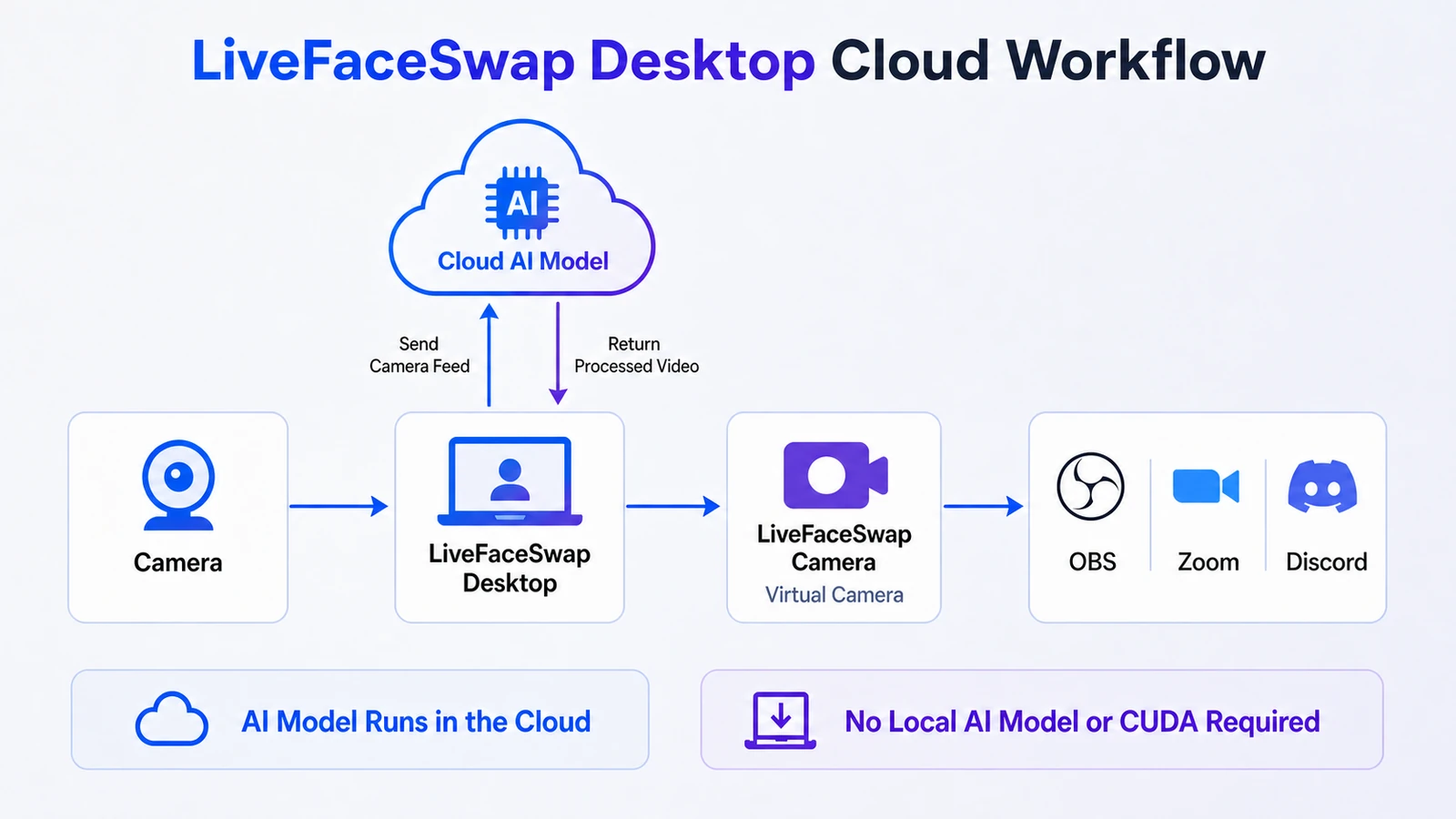
No dedicated local GPU is required. Both the LiveFaceSwap AI browser experience and LiveFaceSwap Desktop run the main AI inference in the cloud, so your computer does not need a dedicated NVIDIA GPU, and you do not need to install CUDA or the AI model locally.
The browser experience is designed for live preview. The camera feed is sent to the cloud for the main AI processing, and the processed result is returned to the browser.
If you need to send the processed video to OBS, Zoom, Discord, or another desktop app, use LiveFaceSwap Desktop and select LiveFaceSwap Camera as the camera input in the receiving app. The Desktop app is installed locally, but that does not mean the AI model runs locally.
To try the browser workflow, follow the LiveFaceSwap AI online guide. If you want to use the processed feed in OBS or another desktop app, see the LiveFaceSwap Desktop guide.
Ready to see it in action? Try real-time face swap online.