
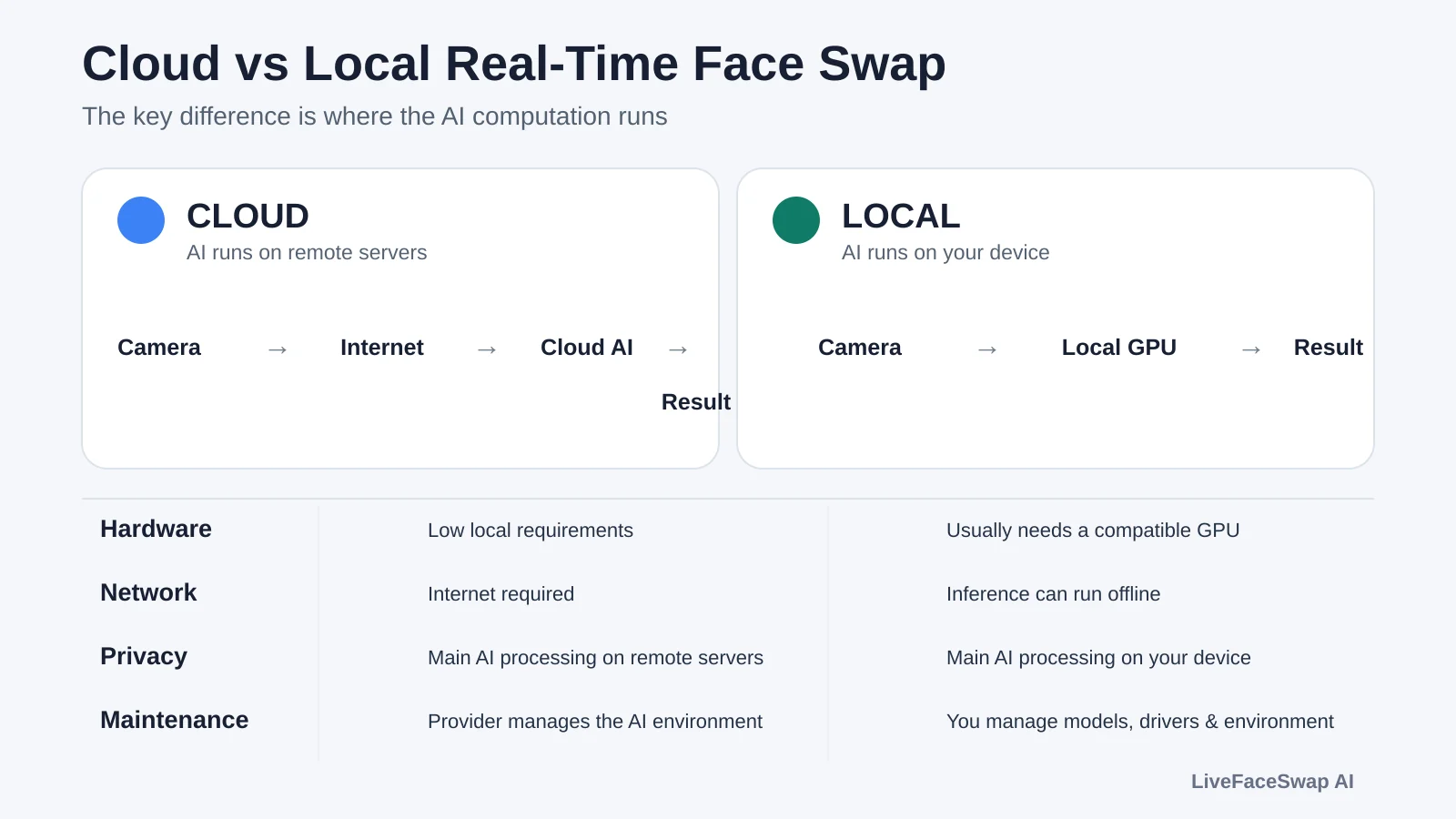
The main difference between cloud and local real-time face swap is where the AI computation runs. Cloud tools run the main AI workload on remote servers. Local tools run it on your own computer. That changes the hardware you need, how much setup is involved, how dependent you are on the network, and how much control you have over the environment.
If you want the fastest path to getting started and do not want to manage AI models or GPU setup, cloud is usually simpler. If you need AI processing to stay on your machine, want offline use, or want full runtime control, local is usually a better fit.
The core difference: where does the AI run?
As a quick rule of thumb, look at two things: do you need to download the AI model to your computer, and does the tool require your local GPU? If both are true, it is usually a local setup. If neither is required and the AI result comes back from a remote service, it is usually cloud-based. The definitive distinction is still where the main AI inference actually runs.
Note: A GPU is not an absolute requirement for every local tool. A smaller number of local tools can also run on CPU, Apple Silicon, or other acceleration backends.
A cloud workflow can be simplified to:
Camera → Internet → Cloud AI → Result back to your device
A local workflow is closer to:
Camera → Local AI inference → Output
This is also why “desktop app” does not automatically mean “local AI.” A program can be installed on your computer while still sending the camera feed to the cloud for the main inference. A local tool may also need internet access for installation, model downloads, licensing, or updates.
If you want to understand what happens inside each frame, the key stages are face analysis, identity generation, blending, and frame-to-frame stability.
How different are the hardware and setup requirements?
Cloud dramatically lowers both the setup and hardware requirements. The main AI workload runs on remote servers, so you usually do not need a high-end dedicated GPU, large local models, CUDA setup, or a complicated AI environment on your own machine.
Local setups usually have a much higher barrier. Besides needing suitable hardware, you may have to deal with drivers, model files, Python environments, FFmpeg, inference backends, and version compatibility. Open-source tools in particular often require some AI and system-maintenance experience when the environment does not work out of the box.
If your main question is whether your computer needs a dedicated GPU, see Does Real-Time Face Swap Need a GPU? for GPU, VRAM, and CPU paths in more detail.
Is local always faster? Latency depends on the whole pipeline
Local inference removes the network round trip to a remote server, so with strong enough hardware and a well-optimized setup, it can achieve very low end-to-end latency.
But local does not mean zero latency. Camera capture, AI inference, compositing, rendering, virtual-camera output, and buffering inside the target app all take time. If your GPU is not fast enough, or the same GPU is also running a game, OBS, or another heavy workload, a local setup can still feel slow.
Cloud adds network transport to the pipeline. Performance can be affected by round-trip time, jitter, packet loss, and server load as well as model speed. On the other hand, cloud services can run inference on hardware built specifically for AI workloads, so the real result still depends on the full pipeline rather than the presence of a network connection alone.
What changes in the processing pipeline?
At a high level:
Cloud: Camera → Encode → Network → Cloud Inference → Network → Decode / Output
Local: Camera → Local Inference → Output
What matters is total end-to-end time, not the speed of one isolated step. A real-time system also has to keep processing the next frame, so stable frame rate and temporal consistency matter alongside single-frame latency. Decart’s real-time AI research also treats latency and continuous generation speed as important real-time model metrics.
Privacy and offline use: where is the data processed?
If the main AI inference runs fully on your own machine, your camera feed and reference image can potentially remain on your device. That is one of the main reasons people choose local tools, especially when footage cannot be sent to a third-party service or when the system has to run offline.
Local does not automatically mean private or fully offline. A local app can still require login, telemetry, online licensing, model downloads, or cloud APIs for some features. The real privacy boundary depends on the actual data flow and product policy.
Cloud tools must send the data needed for AI processing to remote infrastructure, so you should pay closer attention to how the service handles, stores, and deletes that data. Policies differ by provider. “Cloud” does not automatically mean unsafe, just as “local” does not automatically mean no data ever leaves the device.
If privacy is a hard requirement, the useful questions are: what data leaves the device, why does it leave, how long is it retained, and can it be deleted?
Cost: pay for cloud compute or pay for your own hardware?
Cloud and local are not simply “paid” versus “free.” The cost is just placed in different parts of the system.
With cloud, the provider pays for GPUs, servers, electricity, model deployment, and maintenance, then charges through subscriptions, credits, or usage. The upfront cost is low, but ongoing service cost matters more as usage grows.
A local tool can be free and still have real costs. If you already own a suitable computer, the extra cost may be small. If not, you may need a GPU upgrade or a new machine. Long-term costs can also include electricity, hardware depreciation, and the time you spend maintaining the environment.
There is no universal answer to which one is cheaper. Someone who uses face swap occasionally on a laptop and someone who runs it for hours every day on an existing workstation will reach very different conclusions.
Maintenance is part of the cost too
With cloud, the provider usually maintains the model, GPU environment, and backend runtime. You generally do not have to rebuild your local environment when the inference stack changes. The tradeoff is that you depend on the service remaining available and supported.
Local gives you more control, but also more responsibility. Driver updates, model versions, runtime libraries, and operating-system changes can all affect a setup that used to work. Open-source tools make that tradeoff especially clear: you can pin versions, modify code, or replace models, but you also have to diagnose compatibility problems yourself.
That level of control is exactly why some experienced users prefer local setups. For someone who just wants to open a camera and start, the same flexibility can become extra work.
Cloud or local: which should you choose?
Start with your situation and your non-negotiables:
| Your situation | Start with |
|---|---|
| You are a beginner and do not want to configure AI environments | Cloud |
| You do not have a suitable GPU and do not want setup or compatibility work | Cloud |
| You want the fastest way to start without depending on local AI hardware | Cloud |
| The main inference must stay on your own device | Local |
| You need offline operation and the tool explicitly supports it | Local |
| You already have a suitable GPU and can handle environment and compatibility issues | Local |
| You want to modify code, models, or inference backends | Local / open-source |
This is not a performance ranking. A well-optimized local tool can be faster than one cloud service and slower than another if the hardware is weak. The useful comparison is your own hardware, network, privacy requirements, usage frequency, and willingness to maintain the setup.
For a concrete example, LiveFaceSwap AI vs Deep-Live-Cam shows how a cloud product and a local open-source tool differ in setup, hardware, privacy, maintenance, and cost.
Which type is LiveFaceSwap AI?
LiveFaceSwap AI is currently a cloud-based real-time AI solution. Whether you use the browser version or install LiveFaceSwap Desktop, the main AI inference runs in the cloud. You do not need a high-end dedicated GPU for face-swap inference, and you do not need to install the AI model or set up CUDA yourself.
The most common misconception is that LiveFaceSwap Desktop performs AI inference locally simply because it is a desktop app. It does not. Desktop is designed for regular desktop use and can send the processed live video through LiveFaceSwap Camera to apps such as OBS, Zoom, Teams, and Discord, while the main model still runs in the cloud.
If you are deciding between the browser version and Desktop, see LiveFaceSwap Online vs Desktop. That is a different choice from cloud vs local.