
Quick answer: LiveFaceSwap AI is the more direct choice for minimal setup, no dedicated local AI GPU, and direct output to OBS or video-call apps. Choose the Deep-Live-Cam family if you want more control over local processing and the runtime environment.
Deep-Live-Cam is not one fixed edition. Its current lineup is mainly split into GitHub Source, Lite, and Ultimate, and those editions differ in setup, inference location, hardware requirements, Virtual Camera support, cost, and source-code control. Because their capabilities differ, each edition is compared separately with LiveFaceSwap AI.
First, what exactly are we comparing?
This article focuses on real-time webcam face swap rather than Deep-Live-Cam's broader offline image and video features.
| Edition / product | Positioning | Main characteristics |
|---|---|---|
| LiveFaceSwap AI | Managed cloud real-time face swap | Browser live preview; Desktop adds LiveFaceSwap Camera virtual-camera output |
| Deep-Live-Cam GitHub Source | Open-source local edition | Main inference runs locally; source can be inspected and modified; user maintains the environment |
| Deep-Live-Cam Lite | Lightweight pre-built edition | Reduces setup work; supports a basic local mode and a Decart cloud mode |
| Deep-Live-Cam Ultimate | Paid pre-built edition | Packaged for different hardware; more features than Source, including Virtual Camera in the current edition |
As of August 21, 2026, Deep-Live-Cam is primarily offered as GitHub Source, Lite, and Ultimate. Ultimate is currently at 2.7, while Lite is at 1.2, and the three editions do not share the same feature set. See the official edition comparison for features and the plan page for current hardware and pricing details.
The differences that affect the decision
| What matters | LiveFaceSwap AI | Deep-Live-Cam Source | Deep-Live-Cam Lite | Deep-Live-Cam Ultimate |
|---|---|---|---|---|
| How AI runs | Main inference runs in the cloud | Primarily local | Basic local mode + Decart cloud mode | Local and cloud real-time models vary by edition |
| Fastest way to start | Open the browser | Install and configure the source environment | Pre-built client | Paid pre-built client |
| Dedicated local GPU | Not required for cloud inference | CPU can run more slowly; multiple GPU backends are supported | Local mode depends on local hardware; cloud mode moves main inference off-device | Optimized by NVIDIA, AMD, or Mac hardware edition |
| Network dependence | Real-time AI processing requires the cloud service | Local inference does not require a continuous cloud session | Local mode can run locally; Decart requires network + API key | Depends on the selected local or cloud model |
| Local data control | Session camera/reference media must reach the service | Local inference can stay on the machine | Local mode can stay local; cloud mode sends data externally | Depends on the selected model and mode |
| Source-code control | Managed product | Source can be inspected, modified, and pinned | Mainly pre-built GUI use | Mainly pre-built GUI use |
| OBS / Virtual Camera | Desktop exposes LiveFaceSwap Camera | README centers on capturing the preview window | Depends on the current Lite edition | Current Ultimate provides Virtual Camera with edition-specific OBS requirements |
| Cost structure | Plans/credits + metered real-time usage | Source code is free, but hardware and maintenance still cost money | Pre-built edition + possible separate cloud API cost | Paid subscription + local hardware cost |
How do setup, platform support, and maintenance differ?
| Edition / product | How you start | Who maintains the runtime? |
|---|---|---|
| LiveFaceSwap AI | Use the browser directly; install Desktop when another app needs the output | Cloud model and AI runtime are maintained by the service |
| Source | Configure Python, Git, FFmpeg, models, dependencies, and execution providers | You manage dependencies, drivers, models, updates, and troubleshooting |
| Lite | Use the official lightweight pre-built client | Less source-environment maintenance, but version updates and cloud/API configuration still follow the product |
| Ultimate | Use the official paid pre-built edition packaged for specific hardware | Less manual setup; features and updates follow the Ultimate release channel |
LiveFaceSwap AI's public Desktop downloads support Windows 11 and Apple Silicon Macs running macOS 13 or later. With Deep-Live-Cam, you must first know whether you are installing Source, Lite, or Ultimate because the setup instructions are not interchangeable.
For the quickest start, a browser-managed service has the least setup. If you want more control over the software and its versions, Source is more flexible. If you want Deep-Live-Cam without building the source environment, Lite or Ultimate is the more relevant option.
GPU, network, and runtime requirements
| Edition / product | Local hardware | Network dependence |
|---|---|---|
| LiveFaceSwap AI | No dedicated NVIDIA GPU is required for cloud AI inference; normal video capture/display capability is still needed | Real-time AI processing requires the cloud service |
| Source | README says CPU can run it more slowly and documents CUDA, CoreML, DirectML, and OpenVINO paths | Local inference does not require a continuous cloud session |
| Lite | Local mode depends on local CPU/GPU capability | Decart cloud mode requires network access and your own API key |
| Ultimate | Official packages target NVIDIA, AMD, and Mac hardware separately | Network requirements depend on the local or cloud model you choose |
Being able to launch Source on CPU is not the same as delivering the real-time performance you need. Actual responsiveness still depends on the model, resolution, enhancement options, and system load.
The current Ultimate plan pages recommend 6GB or more VRAM for NVIDIA and AMD offerings, while the Mac offering targets Apple Silicon. Virtual Camera support also has edition-specific OBS requirements. Because these details can change, verify the current Deep-Live-Cam plan page before choosing an edition.
For the underlying hardware distinction, see Does Real-Time Face Swap Need a GPU?.
Which has better quality, latency, and stability?
There is no matched head-to-head test showing that LiveFaceSwap AI, Deep-Live-Cam Source, Lite, or Ultimate is universally better for image quality, frame rate, latency, or stability.
Their bottlenecks differ by edition and mode:
| Edition / product | Main factors that affect the result |
|---|---|
| LiveFaceSwap AI | Selected cloud model, camera input, network round-trip, service availability, and settings |
| Source | Model, CPU/GPU, execution provider, resolution, enhancement options, and total system load |
| Lite | Local mode depends on local hardware; Decart mode adds network and API-service behavior |
| Ultimate | Depends on hardware edition, selected model, and whether the active mode is local or cloud-powered |
Deep-Live-Cam publishes hardware-specific FPS examples on its own pages, but those figures are not matched cross-product benchmarks using the same camera, reference image, network, and settings. They should not be treated as a fair head-to-head comparison.
If quality and real-time responsiveness are your first priority, test each relevant option with the same camera, reference image, similar output size, and lighting. Compare motion tracking, side-profile and occlusion consistency, end-to-end delay, sustained smoothness, and whether the session remains stable during continuous use.
Privacy, local data control, and source-code control
| Edition / product | AI/data flow | Source-code control |
|---|---|---|
| LiveFaceSwap AI | Session camera/reference media must reach the service for AI processing | Managed product; no Source-level code control |
| Source | Main inference can stay on your own machine | GitHub source is under AGPL-3.0 and can be inspected, modified, and pinned |
| Lite | Local mode can stay local; Decart mode sends the relevant data externally | Mainly pre-built GUI use |
| Ultimate | Local or cloud behavior depends on the selected model and feature | Mainly pre-built GUI use |
If keeping working media and main inference on your own machine is a hard requirement, Source has the clearest boundary among the three Deep-Live-Cam editions. Local modes can offer similar benefits, but once you enable Decart or another cloud model, processing is no longer fully local.
For LiveFaceSwap AI, review the current Privacy Policy before using sensitive material if you need details about collection, processing, retention, or deletion.
OBS, virtual camera, and live output
| Edition / product | How the live result reaches OBS or a meeting app |
|---|---|
| LiveFaceSwap AI | Desktop exposes LiveFaceSwap Camera as a camera input for OBS, Zoom, Discord, and compatible apps |
| Source | Current README centers on opening the live preview and capturing that preview with software such as OBS |
| Lite | Check the exact current Lite output capability rather than assuming Ultimate's Virtual Camera applies |
| Ultimate | Current edition provides Virtual Camera; the official FAQ describes an OBS-dependent setup that outputs through OBS Virtual Camera |
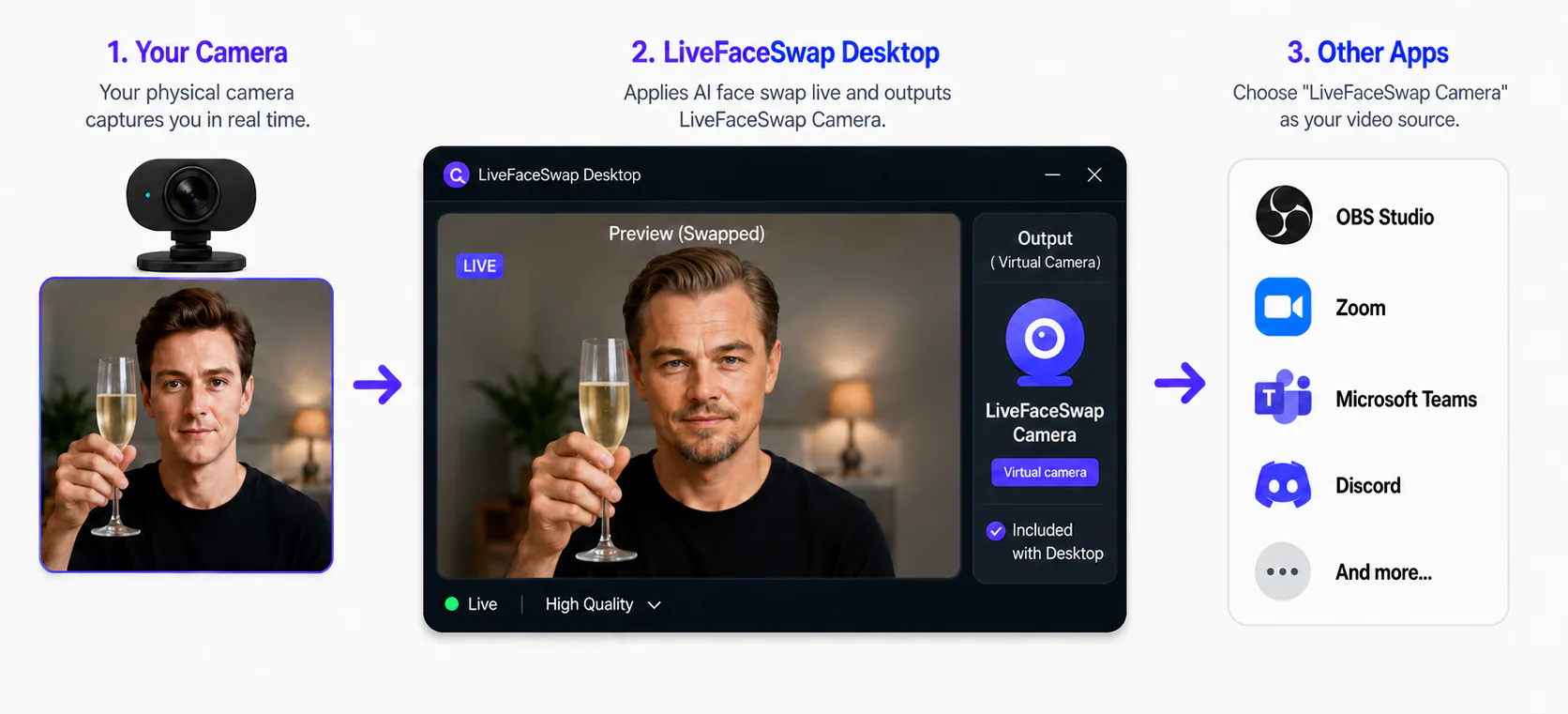
The LiveFaceSwap AI flow is:
Physical camera → LiveFaceSwap Desktop → LiveFaceSwap Camera → OBS / Zoom / Discord
LiveFaceSwap Camera appears as a selectable video device, so OBS does not have to capture a preview window first. See the LiveFaceSwap OBS guide for the exact menus and troubleshooting steps.
Virtual Camera support differs across Deep-Live-Cam editions, so Source, Lite, and Ultimate should be checked separately.
Cost, support, and usage rights
Cost
| Edition / product | Main cost | Additional costs or trade-offs |
|---|---|---|
| LiveFaceSwap AI | Plans/credits + metered real-time usage | Continuous network use; no dedicated local GPU purchase solely for AI inference |
| Source | No Deep-Live-Cam pre-built subscription for the source code itself | Hardware, electricity, setup time, maintenance, troubleshooting |
| Lite | Current pre-built offering | Decart cloud mode requires your own API key and separate API usage cost |
| Ultimate | Official paid subscription | Local hardware/electricity plus edition-specific requirements |
As of August 21, 2026, Deep-Live-Cam Ultimate lists NVIDIA and AMD plans at $22/month or $40/3 months, while Mac plans are $32/month or $60/3 months. Prices can change, so verify the current official plan page.
Deep-Live-Cam is not simply “free”: only the Source code itself can avoid a pre-built subscription; Lite, Ultimate, and cloud API modes each have their own cost boundaries.
Usage rights and licensing
Licensing and model terms also differ across the three Deep-Live-Cam editions:
- Source: the code is under AGPL-3.0, and the current README still says the supplied InsightFace model is for non-commercial research purposes only;
- Lite: review the terms for the pre-built edition, its local model, and the Decart API separately;
- Ultimate: the official 2.7 Ultimate release announcement says that edition removed the InsightFace dependency, so the Source model restriction should not be applied directly to Ultimate; the exact model and edition terms still need to be checked.
LiveFaceSwap AI is governed by its current Terms of Service and Acceptable Use Policy. You must own or have the required permission to use the reference likeness, camera feed, and other media. Access to a tool does not by itself grant commercial rights to somebody else's likeness or content.
Which one fits you better?
Choose LiveFaceSwap AI when you prioritize
- starting from a browser with minimal setup;
- avoiding a dedicated local GPU for AI inference;
- a managed model and runtime;
- direct LiveFaceSwap Camera output to OBS or video-call apps;
- accepting continuous network dependence and service usage cost.
Choose Deep-Live-Cam GitHub Source when you prioritize
- keeping the main face-swap inference on your own machine;
- inspecting, modifying, and pinning source code;
- choosing and tuning your own execution provider;
- reducing dependence on a continuous cloud session;
- accepting more responsibility for hardware, setup, and long-term maintenance.
Choose Deep-Live-Cam Lite when you prioritize
- avoiding a full source-environment build;
- a lighter pre-built entry point than Source;
- choosing between a basic local mode and a Decart cloud mode;
- accepting your own API-key setup and separate API usage charges for the cloud mode.
Choose Deep-Live-Cam Ultimate when you prioritize
- avoiding manual Source maintenance while using the broader Deep-Live-Cam feature set;
- a package targeted at NVIDIA, AMD, or Apple Silicon hardware;
- current Ultimate features such as Virtual Camera or additional real-time models;
- accepting a paid subscription and checking hardware and usage terms for the exact edition.
If your priority is minimal setup + no dedicated local AI GPU + managed cloud inference + a direct virtual-camera output, LiveFaceSwap AI is the more direct option. If your priority is local inference + source-code control + ownership of the runtime environment, Deep-Live-Cam Source is the stronger fit. Lite and Ultimate require less manual setup than Source, but their features, subscriptions, and cloud costs vary by edition.
You can try LiveFaceSwap AI in the browser before deciding. If you need to send the processed video to OBS or video-call software, continue with the LiveFaceSwap Desktop download page.