
A few years ago, real-time face swap usually came with an obvious prerequisite: a capable NVIDIA GPU, local model files, CUDA, and enough patience to make the whole stack work.
That is no longer the only practical architecture.
More precisely, real-time AI face swap has not stopped needing GPUs. The GPU is increasingly moving from the user’s computer to the cloud.
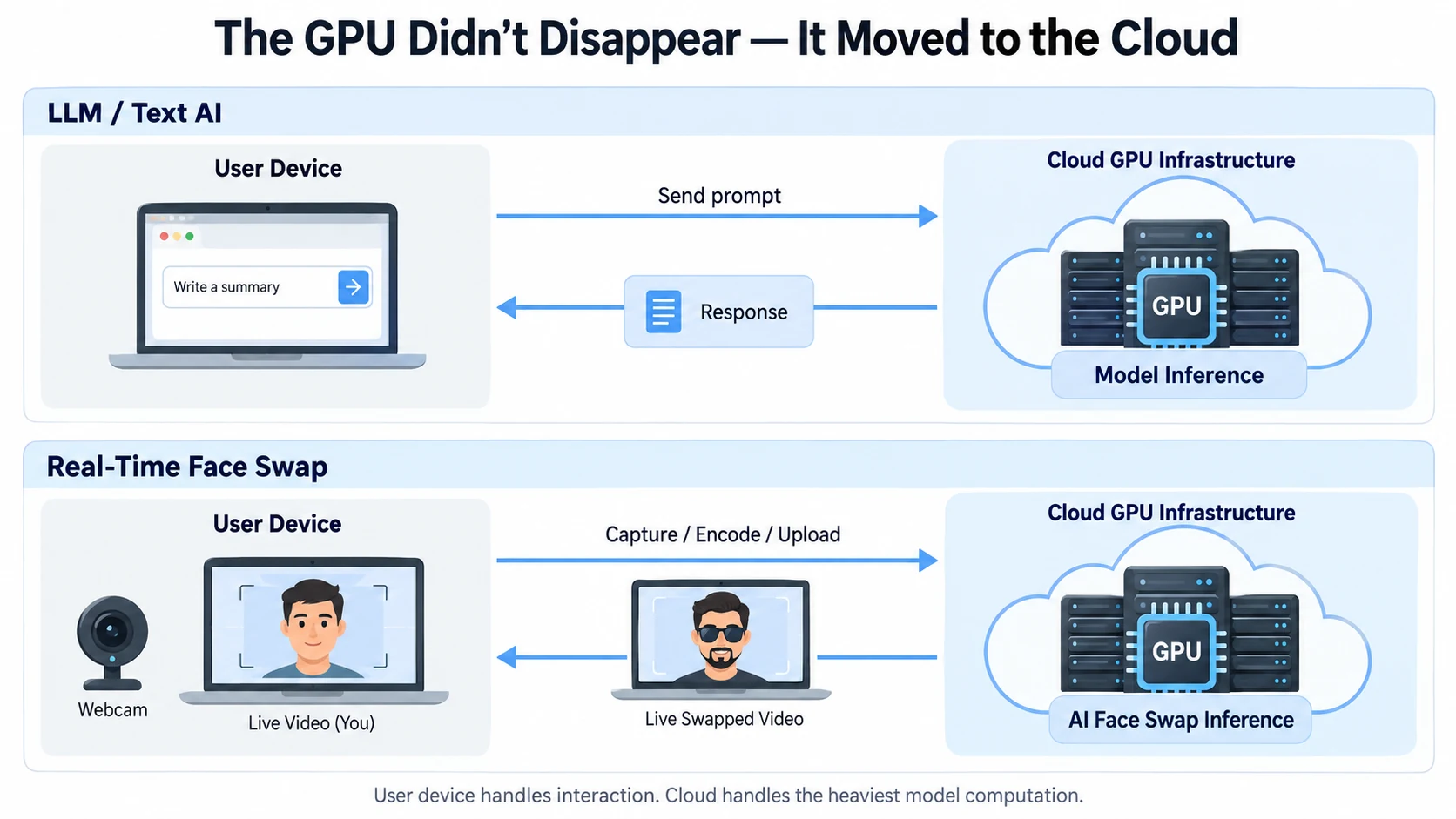
That shift should feel familiar. Many of today’s most capable AI models are delivered as cloud services. The user interacts through a browser or app, while the expensive model inference runs on remote infrastructure.
Real-time face swap is beginning to follow the same pattern.
AI workloads have already been moving to the cloud
Large language models are the clearest example.
Smaller models can run locally, and local inference is useful for privacy, offline access, and specialized workflows. But many larger, more capable models are primarily delivered through cloud services because their memory, compute, deployment, and update requirements are difficult to fit into a typical consumer machine.
That changes the division of labor.
The user’s device mainly handles:
- input and interaction;
- displaying results;
- networking;
- lightweight local processing.
The heavy model inference runs on data-center GPUs.
Cloud AI does not make local AI obsolete. It simply makes large-model capability available without requiring every user to own and maintain the hardware needed to run that model.
Real-time face swap is starting to follow the same path
Early real-time face-swap systems looked much more like traditional desktop AI software. You downloaded the model, pointed the software at a webcam, and your own GPU carried the continuous inference workload.
The architecture was straightforward:
Camera → Local GPU inference → Output
But as AI models become more important to real-time video quality, the compute requirement grows too. Better identity preservation, more robust pose handling, cleaner blending, and more stable output all compete for processing time.
At the same time, users have wildly different hardware.
One person may have a high-end NVIDIA GPU. Another may be on integrated graphics. Some use gaming PCs; others use thin laptops or Macs. If the main AI workload must always run locally, the product has to live with all of those GPU, driver, VRAM, runtime, and operating-system differences.
Moving the main inference into the cloud centralizes that problem.
Why local GPUs used to be the obvious choice
Real-time video has a constraint that ordinary AI requests do not: it cannot simply wait.
A webcam keeps producing new frames. Each one has to be processed quickly enough that the output still feels connected to the person’s movement.
When real-time cloud inference and low-latency video transport were less practical, putting the model directly on the user’s GPU was the most obvious way to avoid a network round trip.
The trade-off was the setup burden:
- users needed compatible hardware;
- models and dependencies had to be installed locally;
- CUDA, drivers, inference backends, and version compatibility could become part of the user experience;
- the same GPU might also be running a game, OBS, or another heavy application.
If your main question is simply whether your computer needs a dedicated GPU, see Does Real-Time Face Swap Need a GPU?. That article focuses on hardware, VRAM, and local-versus-cloud requirements.
The GPU didn’t disappear — it moved to the cloud
A cloud real-time pipeline looks more like this:
Camera → Encode → Network → Cloud GPU inference → Network → Decode and display
The local machine still captures the camera, encodes video, maintains the connection, and displays the result. But the heaviest AI inference is no longer tied to the GPU inside that machine.
That changes the product requirement in an important way:
A user no longer needs to own the hardware capable of running the model they want to use.
The provider can deploy the model on a known GPU environment and manage drivers, runtimes, model versions, and scaling centrally. From the user’s point of view, the experience becomes much closer to using a modern cloud AI product: open the application, connect, and use the model.
Cloud AI trades a hardware problem for a latency problem
Moving inference to the cloud does not remove the engineering challenge. It changes where the challenge lives.
For local inference, one of the biggest questions is whether the GPU can process frames fast enough.
For cloud inference, the entire pipeline enters the latency budget:
Capture → Encode → Upload → Schedule → AI inference → Return → Decode → Render
Network jitter, server scheduling, encoding time, and model speed can all affect the live result.
This is why real-time AI video cannot be evaluated by model inference time alone. What matters to the user is the end-to-end delay between moving in front of the camera and seeing the corresponding AI output.
Cloud is therefore not automatically faster than local. Its main advantage is different: it converts a hardware requirement on every user into an infrastructure problem that the service provider can solve centrally.
For a broader comparison of latency, privacy, cost, offline use, and maintenance, see Cloud vs Local Real-Time Face Swap.
Real-time AI video may increasingly look like today’s LLM products
Face swap is only one category of real-time AI video.
As models become larger and more capable, asking every user to download, configure, and maintain the entire inference environment becomes harder to scale as a product experience.
Cloud infrastructure makes it possible to deploy heavier models centrally and update them without requiring users to rebuild their local AI stack.
The pattern is similar to what has already happened with many LLM products:
The user device handles interaction; the cloud handles the heaviest model computation.
Real-time video is more difficult than text because it is continuous and highly latency-sensitive. But as inference, video transport, and GPU scheduling improve, more real-time AI features can use the same division of labor.
Local inference will remain valuable, especially for offline use, strict data-control requirements, and users who want full control over the model and runtime. Cloud is not replacing local AI. It is making high-compute real-time AI accessible without requiring high-end hardware at the edge.
LiveFaceSwap AI is one practical example of this architecture
LiveFaceSwap AI uses cloud inference for the main real-time AI workload in both the browser experience and Desktop.
That means users do not need to install a large face-swap model locally, configure CUDA, or buy a dedicated high-end GPU specifically for AI inference. The browser can be used for live preview, while Desktop adds a virtual-camera workflow for apps such as OBS, Zoom, and Teams.
This does not make real-time face swap a lightweight workload.
The GPU compute is still there. Like many modern AI services, it has simply moved into managed cloud infrastructure, so the user interacts with a service rather than maintaining an AI environment.
That may be one of the more important shifts in real-time AI video: the models can keep getting heavier without requiring every device that uses them to get heavier too.