
Real-time AI face swap tools replace your face in a live webcam feed while following your expressions and movements. You can try a different look, stream as a character you have permission to use, or use a transformed camera feed in video calls.
These eight options include online face swap services and software that runs on your computer. The comparison focuses on what each tool does, which devices it supports, whether you need a dedicated GPU, and what its free and paid options actually include.
To try face swapping online, start with LiveFaceSwap AI. For face and voice effects together, consider Facecam AI or Magicam. For local processing, compare Swapface and Deep-Live-Cam. The individual sections explain the differences that matter for Mac users, webcam calls and audience-driven streams.
Real-Time AI Face Swap Tools at a Glance
On a phone, swipe the table sideways to see every column.
| Tool | Main features | Platforms | GPU requirements | Free access | Paid access |
|---|---|---|---|---|---|
| LiveFaceSwap AI | Face swap Try-on Restyle | Browser Windows 10/11 Apple Silicon Mac | No dedicated GPU | 36 signup credits Up to 60 seconds | $15/month · 650 credits ~3–18 min of face swap Depends on model rate |
| LiveSync | Face swap Recording and streaming | Browser | No dedicated GPU | 10 minutes at 480p No built-in broadcasting | $9/month 30 minutes at up to 720p |
| Facecam AI | Face swap Voice and avatar tools | Browser Chrome extension | No dedicated GPU for face swap | Camera preview is free AI face swap requires a plan | $10/month · 720 credits About 113–157 minutes |
| Liveface | Face swap Mac camera output | Browser macOS 12.3+ | No dedicated GPU | 30 minutes on signup | $7.99/24 hours $19.99/30 days |
| Deep-Live-Cam | Face swap Configurable source code | Windows Apple Silicon Mac | CPU can run it GPU acceleration recommended | Free source code | Prebuilt downloads From $22/month |
| Swapface | Live face swap Photo and video swaps | Windows Apple Silicon Mac | Windows live guide recommends RTX 4070 Ti or better | Free to start Allowance unspecified | Pay as you go Subscriptions |
| Magicam | Face swap Voice change | Windows | RTX 2070 or better recommended | Unlimited face swap duration Pro removes watermarks | Promotional Pro price $8.99/month |
| Delulu Stream | Character, outfit and environment changes Audience interaction | Browser Windows | Requirements unspecified | Chat-triggered changes Up to 60 seconds each | Paid subscriptions $10 adds 60 minutes |
Prices and free allowances were checked on November 4, 2026. Prices are in US dollars. Plans, promotional offers and free access conditions may change; check each product's official site for current terms. Face swap time is estimated from published allowances and rates; other features may use the same balance.
Use the published features, device requirements and costs to narrow your shortlist, then try the tools on your own computer. Cloud latency depends on your connection, while local performance depends more on your GPU and configuration. Where a free allowance or trial is available, use it in your actual call or streaming setup: check how the result follows speech and head turns before paying or upgrading.
- LiveFaceSwap AI usage time depends on the model. Facecam estimates assume all credits go toward face swapping.
- Deep-Live-Cam prices cover prebuilt downloads and support. Features and system requirements vary by version.
- Delulu Stream minute top-ups are separate from the base subscription. Its Mac version is not yet available.
- Different models and output specifications make minutes and prices an incomplete measure of value.
1. LiveFaceSwap AI: Cloud Face Swap Without a Dedicated GPU
Runs on: Browser / Windows / Apple Silicon Mac, no dedicated GPU | Output: Browser preview; desktop virtual camera | Pricing: 36 signup credits, up to 60 seconds; from $15/month
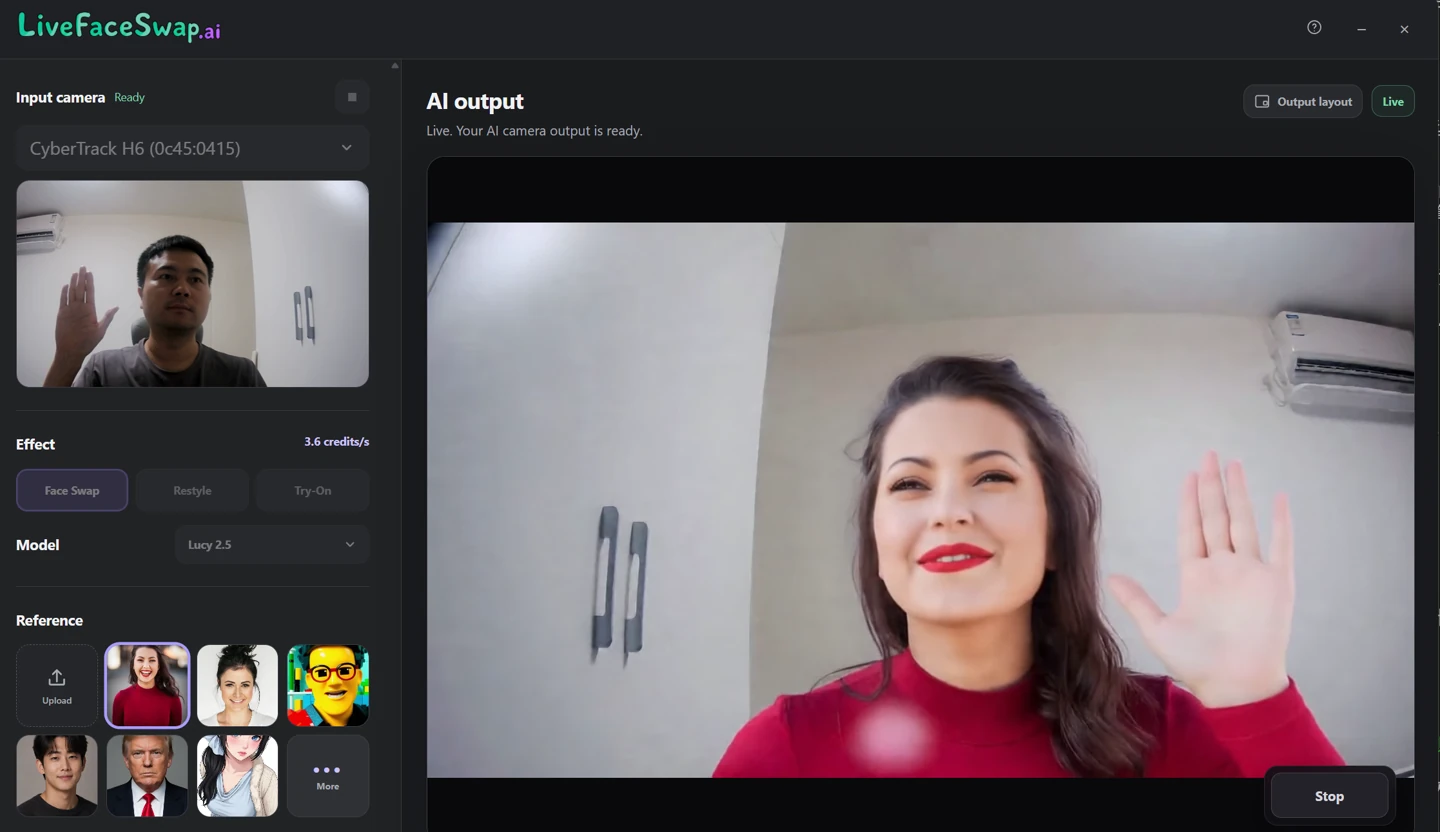
LiveFaceSwap AI lets you try real-time face swap without a dedicated GPU or a local model installation. In the browser workspace, choose a portrait you own or have permission to use, enable your camera, and try the live effect. You can also explore live try-on and restyling.
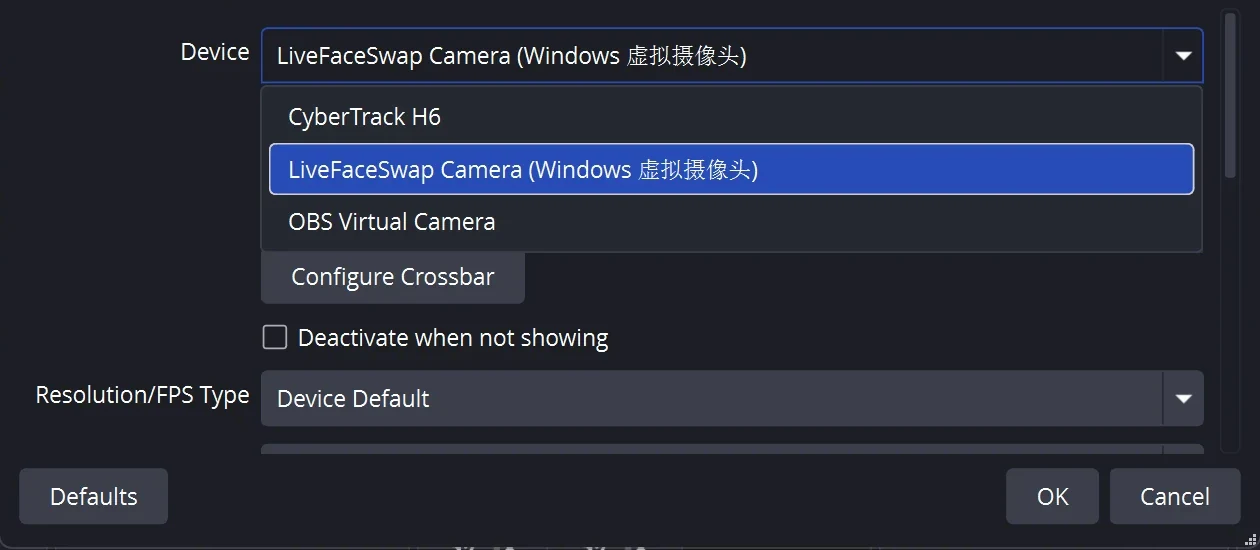
The browser version provides a live preview. For OBS, Zoom or Tencent Meeting, use LiveFaceSwap Desktop, which installs a virtual camera named LiveFaceSwap Camera. Select it as the video source in the app's camera settings. Current desktop downloads support Windows 10/11 and Apple Silicon Macs running macOS 13 or later.
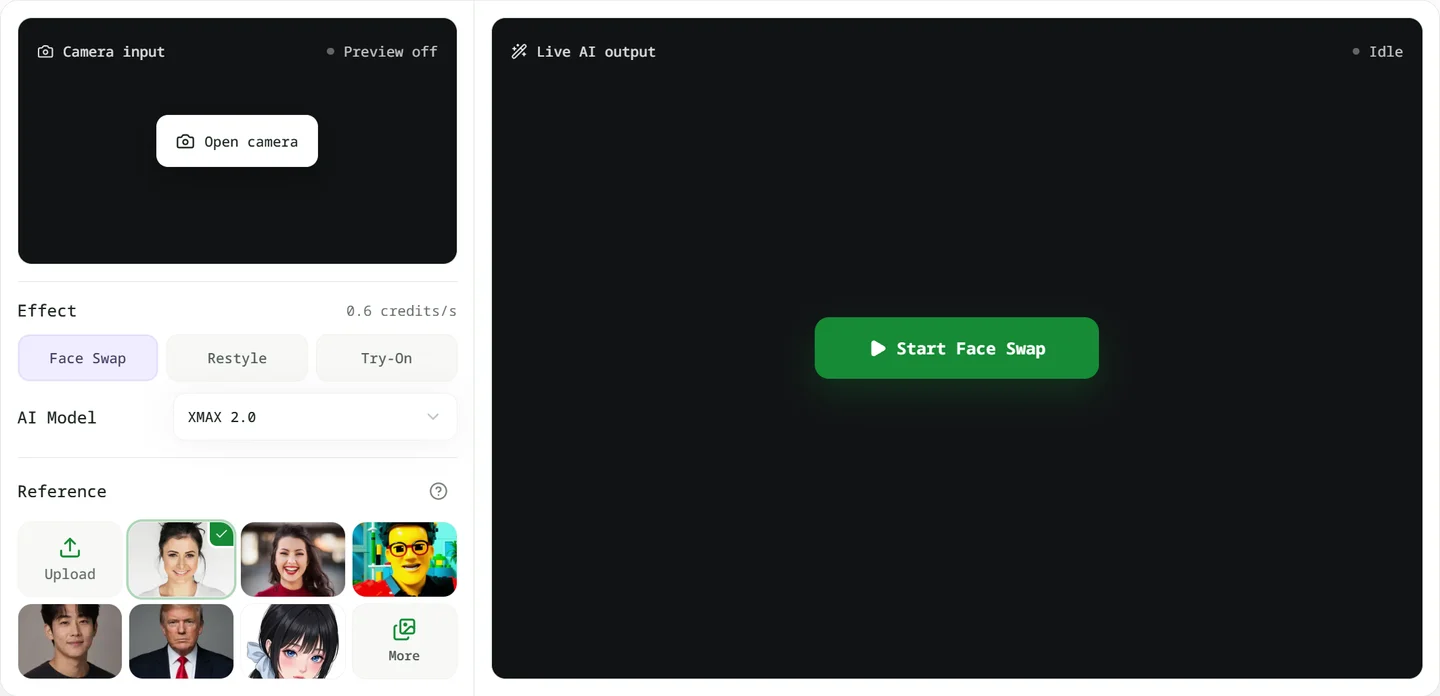
Cloud processing handles the AI work, so you can use a regular laptop with a stable connection. Browser and desktop share the same credit balance. Opening the camera, selecting a reference and waiting for the connection do not use credits; billing starts once live AI output appears.
You can choose between face-swap models, each with its own credit rate. New accounts receive 36 credits, enough for 60 seconds at 0.6 credits per second. The $15 monthly Basic plan includes 650 credits: about 18 minutes of live face swapping at 0.6 credits per second (XMAX), or 3 minutes at 3.6 credits per second (Lucy). Both models replace the face in your live feed; use the trial to compare results. The workspace shows the rate before you start. See the plans and model rates.
For recording and broadcasting, route the desktop app's LiveFaceSwap Camera into OBS. The browser itself provides a live preview without built-in recording or downloads. Choose a local tool if processing must stay entirely on your computer.
2. LiveSync: Browser Recording and Minute-Based Plans
Runs on: Browser, no dedicated GPU | Output: Browser preview and recording; paid built-in broadcasting | Pricing: 10 free minutes; from $9/month
LiveSync combines browser-based face swapping with recording and broadcasting plans. Processing runs in the cloud, so you do not install a face swap model locally. Its documentation covers OBS, Zoom and YouTube workflows, and recordings can be saved as video files.
One credit equals one minute. Starter costs $9 per month for 30 minutes at up to 720p; Creator costs $25 for 90 minutes at up to 1080p. Standard plans list 24 fps. Compare the total allowance, resolution and maximum length of a single broadcast separately.
The free account includes 10 minutes at up to 480p for trying the live effect. The built-in Go Live broadcasting feature requires a paid plan. Free processing time does not include that feature.
Consider LiveSync if you prefer budgeting in minutes and want recording alongside the live preview. Frequent or lengthy broadcasts still need a realistic monthly usage estimate.
3. Facecam AI: Face and Voice Effects for Chrome Calls
Runs on: Browser / Chrome extension, no dedicated GPU for face swap | Output: Browser preview; extension for web calls | Pricing: Free preview; AI face swap from $10/month
Facecam AI brings face swapping, voice effects and avatars into one collection of tools. It is worth considering if you want to experiment with sound and camera effects as well as a different face.
The live swap runs on cloud GPUs. The website provides camera preview, while the Chrome extension supports Google Meet, Zoom on the web, Teams on the web and Discord in the browser. An extension-based camera is different from a system-wide virtual camera. If most of your calls happen in desktop apps, check that distinction carefully: the desktop download is still at the early-access signup stage.
The monthly Starter plan costs $10 and includes 720 credits. At the published rate of roughly 4.6–6.4 credits per minute, that works out to about 113–157 minutes if used only for face swapping. Monthly credits do not roll over. Camera preview and some tools are free, but live AI face swapping requires a paid plan; using voice or other paid features draws from the same balance.
Its appeal is the combination of tools and the Chrome call workflow. Decide whether you need those extras and whether browser calls are how you actually work.
4. Liveface: Native Mac Camera Output and Access Passes
Runs on: macOS 12.3+ / browser, no dedicated GPU | Output: Mac system camera; OBS on other systems | Pricing: 30 signup minutes; $7.99 for 24 hours
Liveface stands out for its native Mac camera output. On macOS 12.3 or later, you can install the Liveface Camera extension and select it in Zoom, Meet or Teams. AI processing runs on the server, so the Mac does not need an RTX card. Windows and Linux users use the browser studio with OBS capture to pass the output to other software.
It sells access periods rather than a fixed bundle of minutes: $7.99 for 24 hours or $19.99 for 30 days, both one-time payments without automatic renewal. Signup includes 30 free minutes, and the Mac camera works during the trial. Paid access is advertised as unlimited swapping, with capture up to 960×540.
Liveface is worth considering for live face swapping on a Mac if you prefer native camera output and time-based passes. Keep the resolution in mind when comparing unlimited access: the advertised HD capture specification is not 1080p.
5. Deep-Live-Cam: Local, Open-Source Face Swapping
Runs on: Windows / Apple Silicon Mac; source supports CPU or GPU | Output: Source preview window via OBS | Pricing: Free source; prebuilt plans from $22/month
Deep-Live-Cam is an open-source real-time face swap project on GitHub that starts from a single reference photo. You can work from source if you are comfortable installing Python, dependencies and models. Lite and paid prebuilt versions provide other entry points.
The source, Lite and prebuilt versions have different setup and usage requirements. The source version runs locally and can use either the CPU or supported GPU acceleration. CPU support does not guarantee smooth live streaming; hardware and acceleration settings matter. Its source-code webcam guide uses OBS to capture the preview window, so do not assume it has every feature advertised for a paid build.
The NVIDIA and AMD prebuilt download/support plans are $22 per month each; the Mac plan is $32 per month. Lite's Decart cloud mode requires your own API key, with API usage charged separately. Those download subscriptions are not a fee for the open-source code or an all-inclusive cloud minute allowance.
This is the more hands-on choice for people who want control over their environment. For commercial work, distinguish the code license from the model license: the README flags non-commercial research restrictions on the InsightFace models it uses. For the cloud-versus-local decision, see our LiveFaceSwap AI and Deep-Live-Cam comparison.
6. Swapface: Local Desktop Processing on Windows and Mac
Runs on: Windows / Apple Silicon Mac; RTX 4070 Ti+ recommended for Windows live use | Output: Windows virtual camera or OBS; OBS on Mac | Pricing: Free to start; usage-based or subscription
Swapface offers a packaged desktop interface for people who prefer local processing. It supports Windows and Apple Silicon Macs, with live webcam face swapping as well as photo and recorded-video features.
On Windows, the listed baseline includes Windows 10 22H2 or later, 16GB RAM and an RTX 2060/3060-class or better card with at least 6GB VRAM. The live-streaming manual recommends an RTX 4070 Ti or better for improved real-time performance. If you already own suitable hardware, it is a candidate to try; if you would need to buy a GPU, include that cost in the comparison.
Output differs by platform. The Windows guide describes SwapFaceCam and an OBS virtual-camera option. The Mac guide uses OBS Virtual Camera to send the processed video into apps such as Zoom and Meet, adding an OBS setup step.
Swapface is free to start, with pay-as-you-go and subscription options listed separately. Its strengths are the desktop interface and local processing; hardware requirements and platform-specific output setup are the main practical hurdles.
7. Magicam: Local Face and Voice Change on Windows
Runs on: Windows, RTX 2070+ recommended | Output: Built-in virtual camera | Pricing: Free unlimited face swap time; Pro offer $8.99/month
Magicam is a Windows option combining live face swapping, real-time voice change and a built-in virtual camera. It is particularly relevant if you want to change face and voice together and already have a suitable GPU.
AI processing runs locally. The recommended dedicated GPU is an RTX 2070 or better, and the virtual camera makes the processed feed available to other applications without assembling an open-source environment yourself.
The free features include unlimited face uploads, unlimited face swap duration and the virtual camera. Watermark removal and advanced adjustments require Pro. The displayed promotional prices are $8.99 per month or $49.90 per year; those offers may change.
Compare the free version's watermark and controls with what you need for a stream or call. Also distinguish recorded-video features from live output: an advertised 4K video face swap feature is not evidence of 4K webcam performance.
8. Delulu Stream: Chat-Triggered Character Effects
Runs on: Browser / Windows; Mac coming soon | Output: Virtual camera or OBS, depending on version | Pricing: Free chat effects up to 60 seconds each; subscription for longer effects
Delulu Stream is aimed at streams where viewers help decide what happens next. Chat commands or a Twitch extension can trigger live character, outfit and environment changes. Streamers can choose community skins or upload their own material.
That makes it a different proposition from keeping one replacement face throughout a call. Transformations can be tied to Bits, Super Chats or Kicks, making them part of an audience-driven show.
Chat-triggered transformations are free for up to 60 seconds each. Longer transformations require a paid subscription. A separate minute top-up adds 60 minutes for $10, and those added minutes do not expire. That top-up price is not the full subscription cost.
Check the output path for the version you use. The download page describes a desktop virtual-camera option, while the Windows Store build still lists OBS as required. The Mac version is marked as coming soon. Choose it for audience interaction. A simple webcam tryout or occasional meeting rarely needs a chat-driven setup.
Which Real-Time Face Swap Tool Fits Your Setup?
- An ordinary laptop: start with LiveFaceSwap AI. For Chrome-based calls, consider Facecam AI; for recording and minute-based plans, look at LiveSync.
- A capable Windows GPU: compare Swapface and Magicam for a packaged interface, or Deep-Live-Cam if you want to configure the environment yourself.
- A Mac: consider LiveFaceSwap AI or Liveface for system camera output. For local processing on Apple Silicon, compare Swapface and its OBS requirements.
- Long daily sessions: weigh cloud usage, access passes and local hardware costs against expected hours, watermarks, output specifications and setup time.
- Audience-controlled character changes: look at Delulu Stream's chat and interaction features.
When sending video into OBS through a desktop virtual camera, select the processed output rather than the original physical webcam. For LiveFaceSwap Desktop, that device is named LiveFaceSwap Camera.
If processing must stay on your computer, verify that the particular mode runs locally. A desktop app can still include cloud modes. Use portraits and camera footage you own or have permission to use, and disclose AI face swapping whenever viewers could mistake the output for someone's real identity.
Try real-time face swapping on your own computer
Try it in your browser without installing a local model or needing a dedicated GPU. New accounts receive 36 credits, enough for 60 seconds at 0.6 credits per second. Trial duration varies if you choose a model with a different rate.
Try it in your browser · Download the desktop app for OBS or Zoom
Frequently Asked Questions
Is there a free real-time AI face swap tool?
Yes, but a one-time trial, ongoing free features and free source code are different offers. For streaming, also check watermarks and output access. LiveSync's 10-minute free allowance, for example, does not include its built-in Go Live broadcasting feature.
Do I need to train a face swap model?
Not necessarily. Many tools start from a single reference photo, and cloud services do not require you to train a model. Local software may require downloading existing models and configuring dependencies. Installing a pretrained model is different from training one yourself.
Can I use real-time face swap in Zoom or OBS?
Yes. With LiveFaceSwap Desktop, select LiveFaceSwap Camera as the video source in OBS, Zoom or Tencent Meeting. Other tools may use a Chrome extension for web calls, or require OBS to capture a preview window and pass it through OBS Virtual Camera. For a practical setup example, follow our LiveFaceSwap OBS guide.