
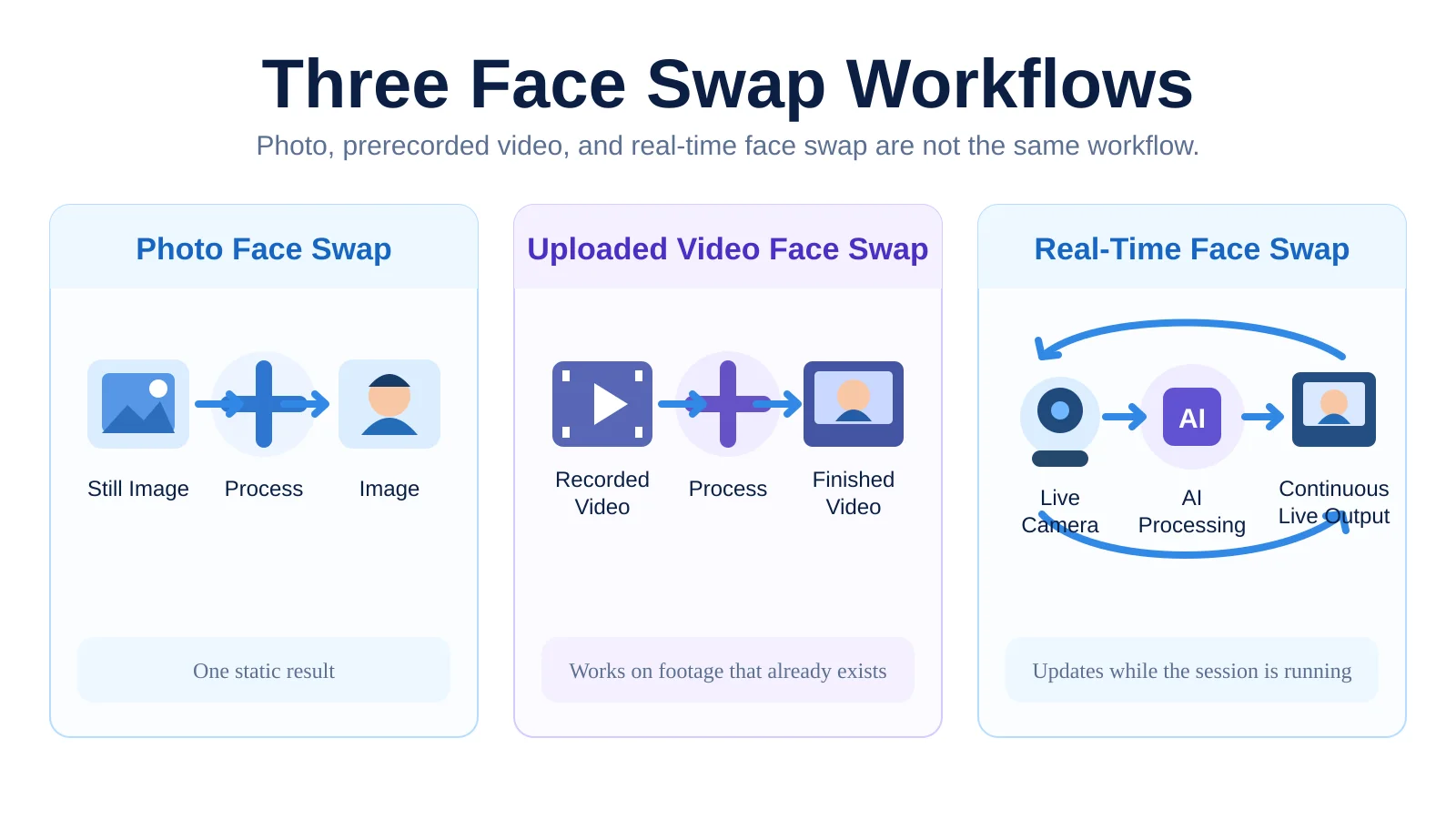
Photo face swap, uploaded-video face swap, and real-time face swap all change identity, but they are three different workflows. A photo swap only has to process one still image. An uploaded-video swap works on footage that already exists. A real-time face swap has to keep producing new results while the camera is still running.
In this article, “traditional face swap” mainly refers to the first two workflows: photo face swap and prerecorded video face swap. The biggest difference is not simply the input format. It is when the processing happens and how much time the system has to produce a usable result.
Photo, video, and real-time face swap are three different workflows
The easiest way to separate them is to look at what the system receives and when the result becomes available.
| Comparison | Photo Face Swap | Uploaded Video Face Swap | Real-Time Face Swap |
|---|---|---|---|
| Input | Still image | Prerecorded video | Live camera feed |
| Output | One image | Finished processed video | Continuously changing video stream |
| When the result appears | After processing | After all or part of the footage is processed | While the session is running |
| Must follow motion | No | Yes | Yes, and quickly |
| Does latency matter? | Usually very little | Usually not the main constraint | Very much |
| Typical uses | Image editing, avatars, fun images | Post-production, finished videos | Streaming, video calls, live creation |
Photo face swap is the simplest case: the system receives a target image and a reference identity, and it only has to produce one final result.
Uploaded-video face swap is harder because the person may speak, turn, and change expression, so neighboring frames also need to remain visually consistent. But the system is still working with footage that already exists and can process it after recording has finished.
Real-time face swap is different. New camera frames keep arriving, so the system has to receive, process, and return new output continuously.
Traditional face swap is not one single technology
“Traditional face swap” does not automatically mean “traditional AI face swap.” Face replacement in photos and prerecorded video has been implemented in very different ways over the years.
One classic approach does not require generative AI at all. A system can detect the face and facial landmarks, align another face to the target, warp or transform the replacement region, and then blend it back into the original frame with masks, color correction, and edge blending.
A simplified version of that pipeline looks like this:
Detect face → Align landmarks → Warp or replace the face region → Blend it back into the frame
For example, OpenCV’s seamlessClone is a well-known image-compositing tool for blending a source region into a destination image. The open-source wuhuikai/FaceSwap project uses OpenCV and dlib for face alignment, color correction, and image blending, with examples for images, video, and camera input. These approaches show that face swapping does not necessarily mean generating a new person from scratch; it can also mean detecting a face and transforming, replacing, and compositing existing image regions.
The other major family is AI-based face swap. Here, a model learns or extracts identity information and uses the target frame’s pose, expression, and lighting to generate or reconstruct a new face region. The classic open-source Faceswap project uses deep-learning models for image and video face swapping, while newer projects such as FaceFusion combine multiple modern face-processing capabilities in one workflow.
The important distinction is this: “photo face swap” and “uploaded-video face swap” describe the input and workflow; “classic image processing” and “AI model” describe the technology used inside the system. Those are two different dimensions.
The real difference is when the processing happens
Uploaded-video face swap and real-time face swap both work with sequences of frames, so they can look similar from the outside. But the user experience changes completely depending on whether processing happens after the action is over or while the action is happening.
A typical uploaded-video workflow looks like this:
Record → Upload → Wait for processing → View or download the result
If a one-minute video takes several minutes to process, the workflow can still be perfectly usable as long as the finished result is good enough.
Real-time face swap has much less room to wait. Its loop is closer to:
Camera input → AI processing → Show result → Receive the next frames → Repeat
When you turn your head, open your mouth, or change expression, the output has to respond quickly. Otherwise, even if individual frames look good, the experience will feel delayed.
That leads to a simple rule: being able to process video does not mean a system can process a live webcam feed. For streaming, video calls, and live interaction, the transformed output has to be available while the interaction is happening, not minutes after the recording ends.
For a deeper look at the live processing loop, see How Does Real-Time Face Swap Work?.
When should you use real-time vs traditional face swap?
They solve different problems, so real-time face swap should not be treated as a universal “upgrade” over traditional face swap.
Photo face swap is a good fit when you only need one static result: profile images, image editing, memes, or quick visual experiments. The final image matters; there is no need to follow motion.
Uploaded-video face swap is a better fit when the footage has already been recorded. That can include short-form video, ad creative, or other content intended for post-production. The priority is the finished video, not whether the result is visible during processing.
Real-time face swap is useful when the output needs to change together with the person on camera. For example:
- letting a character follow the streamer’s expressions and movements during a live stream;
- using the AI-processed feed as a camera source in a video call;
- recording content while watching the transformed result as you perform;
- switching identities or visual looks immediately during a live demo or interactive experience.
Real-time workflows also provide immediate feedback. If a certain angle, expression, or reference image does not work well, you can adjust it on the spot instead of discovering the problem after an entire video has finished processing.
For more practical examples, see What Can You Do with Real-Time Face Swap Today?.
Why real-time face swap also has to balance speed, stability, and quality
Once the workflow difference is clear, the technical constraints of real-time face swap make more sense.
Photos and offline video do not have the same strict response-time requirement. A photo can take longer to process. A prerecorded video can use heavier processing, regenerate sections, or be corrected later in post-production. The system does not have to return a usable result immediately just because another camera frame has arrived.
Real-time face swap is always under time pressure. The camera keeps sending new frames. If processing falls behind, latency grows and the result may begin to feel delayed or drop frames.
Speed alone is not enough. The output also has to remain stable from frame to frame. A sequence can contain individually convincing images and still look unnatural in motion if the identity, face edges, or facial details shift slightly from one frame to the next. This problem is commonly discussed as temporal consistency.
A real-time system therefore has to balance several things at once:
- whether each frame looks good enough;
- whether neighboring frames remain stable;
- whether motion and expressions are followed quickly;
- whether end-to-end delay from camera input to visible output stays low enough.
That does not mean traditional face swap always has higher quality, or that real-time face swap is automatically worse. The final result still depends on the model, reference image, source footage, and processing method. The difference is that a real-time system must treat responsiveness as a core quality metric, while offline processing has more time to optimize the finished output.
How do you know which one you need?
A simple question usually gives the answer: does your source material already exist?
If you already have a photo or a recorded video and only care about the finished result, photo face swap or uploaded-video face swap is usually the better fit. Those workflows do not have to meet real-time latency requirements and can focus on final output quality.
If you need the picture to change while you are speaking, turning your head, making expressions, or interacting with someone, then you need real-time face swap.
In short:
- Processing material that already exists → photo or uploaded-video face swap
- Processing something that is happening right now → real-time face swap
That timing difference is the clearest dividing line between the two workflows.