
Real-time face swap websites change the face in your webcam feed while you talk, smile and turn your head. If you want to try a different look, start by checking which sites let you see the effect in your browser.
After signup, 36 credits let you try live face swapping in the LiveFaceSwap AI workspace without a card (about 60 seconds with XMAX); use the desktop virtual camera later for calls or OBS. For a 30-second preview before signup, consider Onlyface; for a free allowance with recording, compare LiveSync. Facecam AI offers paid face swapping for Chrome web calls, while Delulu Stream focuses on character changes and audience interaction during streams.
Browser trials differ: opening a camera, generating a free AI swap, and recording or broadcasting the result are separate offers. Some of these six sites also need an extension or desktop app to send the result into a call. Delulu Stream's broader character changes and SwapStream's multichannel broadcasting make them supplementary choices; sites that only swap faces in uploaded photos or prerecorded clips are outside this list.
Compare trial conditions first, then test with your own connection, camera and reference photo; a demo clip cannot tell you how a cloud service will respond on your network.
Free Access and Limits Across Six Websites
On a phone, swipe the table sideways to see every column.
| Website | Browser features | Free access and conditions | Paid starting point |
|---|---|---|---|
| LiveFaceSwap AI | Face swap, try-on, restyle Live preview | 36 signup credits, no card ~60 sec with XMAX | $15/month · 650 credits ~18 min with XMAX ~3 min with Lucy |
| LiveSync | Face swap and recording Paid built-in broadcasting | 10 free minutes · 480p No built-in broadcasting | $9/month 30 minutes · 720p |
| Onlyface | Presets or your reference photo Live preview | 30 seconds without signup 30 more minutes after signup, no card | $7.99 for 24 hours $19.99 for 30 days |
| Facecam AI | Face, voice and avatar tools Chrome web-call integration | Free camera preview AI face swap requires payment | $10/month · 720 credits ~113–157 minutes of face swap |
| Delulu Stream | Character, outfit and scene changes Audience interaction | Free chat-triggered changes Up to 60 seconds each | Subscription for longer changes Separate top-up: $10/60 minutes |
| SwapStream (supplementary) | Cloud face swap, multistreaming Custom RTMP | Trial entry point Duration and card requirements unclear | Full plan prices not clearly published |
Prices are in US dollars. Face-swap time is estimated from the relevant credit rates: LiveFaceSwap AI varies by model, and Facecam AI's estimate assumes all credits go toward face swapping. Delulu Stream's minute top-up is separate from its base subscription.
Trial Conditions and Output Options by Website
1. LiveFaceSwap AI: Try It Online, Use the Desktop App for Calls
Trial terms: 36 signup credits, about 60 seconds with XMAX, no card | Output: Browser preview; desktop virtual camera for calls and OBS
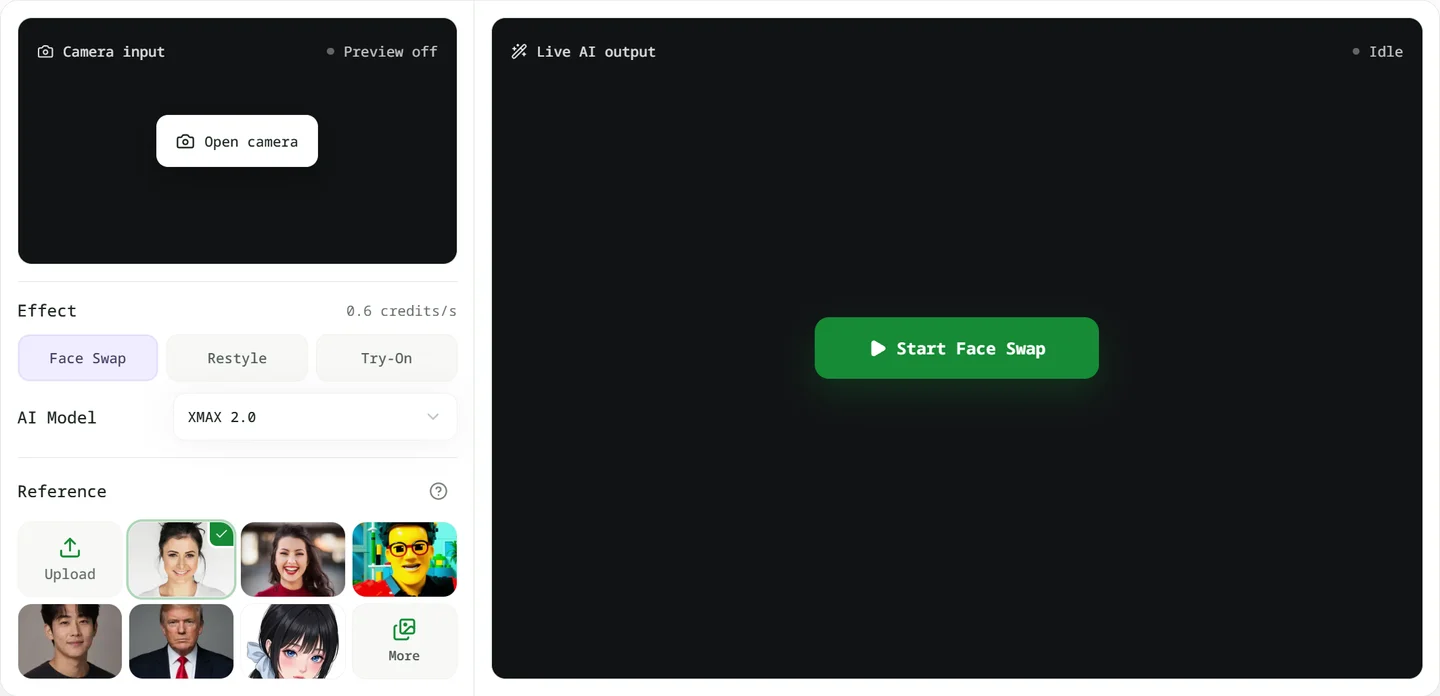
The LiveFaceSwap AI browser workspace keeps the camera input, reference portrait and AI output together. Choose a portrait you own or have permission to use, enable your camera, and try the live swap. Try-on and restyling are available in the same workspace. Cloud processing handles the AI work, so you do not need to install models locally; you do need a stable connection.
For live face replacement, 36 credits provide 60 seconds at 0.6 credits per second (XMAX), or 10 seconds at 3.6 credits per second (Lucy). Both are face-swap models, so you can compare the results before choosing. The $15 monthly Basic plan includes 650 credits, equivalent to about 18 or 3 minutes at those respective rates. The workspace displays the rate before you start; see the pricing plans for the full options.
Opening the camera, choosing a reference and waiting for a connection do not use credits. Billing starts when live AI output appears. Set up your lighting, framing and reference photo first so you can spend the trial watching the effect rather than adjusting your chair.
The browser is for live preview, without built-in recording, downloads or saved playback. For recording, streaming or calls, use LiveFaceSwap Desktop and select LiveFaceSwap Camera in OBS, Zoom or Tencent Meeting. Browser and desktop use the same account balance.
2. LiveSync: Free Recording, Paid Built-In Broadcasting
Trial terms: 10 free minutes, up to 480p at 24 fps | Output: Browser preview and recording; paid built-in broadcasting
LiveSync is worth comparing if you want to keep a short swapped clip rather than just watch a preview. Its plans separate the minute allowance, picture resolution, recording and broadcasting access.
The free plan provides 10 credits, with one credit equal to one minute. It supports recording at up to 480p and 24 fps, with a maximum of 10 minutes per recording. Its built-in Go Live broadcasting feature requires a paid plan.
Starter costs $9 per month for 30 minutes at up to 720p and includes built-in broadcasting. Use the free allowance to judge the effect and recording quality before paying for more time or a higher resolution.
3. Onlyface: A 30-Second Swap Before Signup
Trial terms: 30 seconds without an account; 30 more minutes after signup, no card | Output: Live browser preview, no native app
Onlyface offers a quick way to see a live swap without giving your email first. Choose an AI preset or a photo you have permission to use, allow camera access, and try the 30-second preview. Signup adds 30 free minutes without a credit card.
It works through current desktop and mobile browsers, with camera support varying by device. That makes it an option for checking expressions, head turns and different looks before committing to an account.
After the free time, access passes cost $7.99 for 24 hours or $19.99 for 30 days. The paid periods are advertised as unlimited swapping and include watermark removal. Compare those time passes separately from metered minute plans; unlimited access alone does not establish picture quality or connection stability.
There is no native app. If you need to send the result to a call or stream, confirm the output route before buying a pass. A live image in a browser is not automatically a system virtual camera.
4. Facecam AI: Chrome Call Integration, Paid AI Swapping
Trial terms: Camera preview and some tools are free; AI face swap is paid | Output: Chrome extension for web calls
Facecam AI combines face swapping with voice and avatar tools. Its Chrome extension can supply the transformed camera feed to Google Meet, Zoom on the web, Teams on the web and Discord in Chrome.
Previewing the effect on its website and using it in a call are separate steps: you need the extension to select its camera in supported web calls. The desktop version is still taking early-access signups rather than offering a direct download.
Camera tests, some effects and photo tools are free; live AI face swapping requires a paid plan. Starter costs $10 per month for 720 credits. At the listed 4.6–6.4 credits per minute, that is about 113–157 minutes if used only for face swapping. Monthly credits do not roll over, and other paid tools draw from the same balance.
It suits readers who already want face swapping in Chrome calls and are prepared to pay. If you just want to try AI face swapping for free, choose a site whose free allowance includes AI processing.
5. Delulu Stream: Let Viewers Choose Your Next Character
Trial terms: Free chat-triggered changes, up to 60 seconds each | Output: Virtual camera or OBS, depending on version
Delulu Stream is aimed at people already streaming. Viewers can trigger character, outfit or environment changes through chat commands or a Twitch extension, and the streamer can choose community skins or upload their own material.
The attraction is participation: a character change becomes part of the show instead of a look you keep for the whole session. Transformations can also connect to Bits, Super Chats or Kicks.
Free chat-triggered changes last up to 60 seconds each. Longer transformations require a subscription; a separate $10 top-up adds 60 minutes. That top-up is not the full subscription price.
Starting on the website does not mean the entire broadcast needs no additional software. The recommended desktop version provides a virtual camera, the Windows Store version requires OBS, and the Mac version is still listed as coming soon. For a casual browser face swap, setting up a streaming account and chat integration may be more than you need.
6. SwapStream: An Extra Option for Multistreaming
Trial terms: Entry point available; free duration and card requirements unclear | Output: Multiple channels and custom RTMP
SwapStream is a further option if your goal is to send a swapped feed to several live channels. Its website describes cloud face swapping in a browser, multistreaming and custom RTMP destinations: add a video source, provide a reference face and set your broadcast targets.
The public pages do not clearly state the trial duration, whether a card is required or full plan prices. Confirm those terms and current service availability before planning a broadcast around it. For a quick free webcam experiment, start with a site whose allowance is clear.
How to Make a Short Free Trial Useful
Use a clear, front-facing photo of yourself or someone who has given permission. Keep the lighting and camera distance similar when comparing websites. Go beyond sitting still: speak, smile, turn your head slowly, then briefly move a hand across your face. Watch the mouth, eyes, face edges and how the image recovers after an obstruction.
Judge the things that matter for your use: resemblance to the reference, expression, response to movement and whether visible glitches would distract from the call or stream. A short trial can reveal basic issues, but it does not establish stability over a long broadcast.
Check whether the allowance uses seconds, minutes or credits, when billing starts, whether there is a watermark, and whether recording or broadcasting is included. Stop AI processing normally when you finish and confirm that the session has ended. Use only portraits and camera footage you own or have permission to use.
Choose for Previewing, Recording or Live Calls
To explore different looks: Start in the LiveFaceSwap AI workspace, or use Onlyface if you want a preview before signup. For the basic workflow, see our online live face swap guide.
To keep a clip: Check recording and download access first. LiveSync includes recording in its free plan. LiveFaceSwap AI's browser preview does not record or download video. To record with OBS, start face swapping in the desktop app, then select LiveFaceSwap Camera as the camera input in OBS.
For calls or streaming: Choose the output route for the app you use. LiveFaceSwap AI has a desktop virtual camera, Facecam AI has Chrome web-call integration, and Delulu Stream focuses on viewer participation. The call or broadcast app needs to receive the transformed feed, not just the original webcam. See the OBS setup guide for an example.
For local software and open-source alternatives, compare our real-time AI face swap tools. Use authorized likenesses and disclose AI face swapping where viewers could otherwise mistake the result for someone's real appearance.